The question of whether to run ads to grow your Facebook group comes up frequently among community leaders. With many experts claiming you must “pay to play” to get traction on social media, it’s worth examining whether ads are truly the right growth strategy for your community.
Like any growth tactic, ads can be effective if they align with your goals and you know how to use them well. This article addresses what you need to consider before investing in ads for community growth.
Understanding the True Cost
While the financial investment is significant – most experts recommend at least $500 a month in ad spend for meaningful results – the real cost goes beyond money. The biggest consideration is the potential impact on your community’s culture and engagement levels.
Rapid growth through ads often means bringing in cold traffic – people who don’t know you or your community’s values. Members tend to be most active in a group when they are brand-new. That’s when they are introducing themselves, commenting on existing posts, and asking all the get-to-know-you questions
When you gain hundreds of new members quickly, you risk dramatically shifting your group’s culture and dynamics. Even just 500 new members in a month can significantly impact your community’s atmosphere.
Quality vs. Quantity: The Hidden Trade-off
Many community leaders are drawn to ads for their potential to deliver rapid growth. However, there’s an important distinction between growth and meaningful engagement. People who join through ads are often responding to an offer or incentive rather than actively seeking to join your community. This means they may be less invested in participating and contributing to discussions.
If someone joins your group because they had to join to access a free resource or challenge, their commitment level will likely differ from someone who sought out your community specifically for its value and culture.
Understanding Member Types and Engagement Patterns
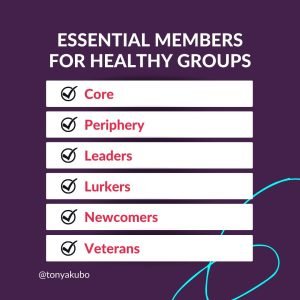
University of Queensland Associate Professor Stan Karanasios, an expert in digital technology and society, has done extensive research in the area of Facebook group dynamics.
Leaders who influence group opinion and engagement
Lurkers who read but rarely participate
Newcomers eager to learn and connect
Veterans who bring historical perspective
When using ads for growth, you dramatically increase the proportion of newcomers, which can disrupt these natural community dynamics. While newcomers can bring fresh energy and perspectives, too many at once can overwhelm your established community culture.
Making Ads Work: Essential Prerequisites
If you decide to pursue ads for community growth, having these elements in place first is crucial:
Clear Purpose and Promise — Your group needs a well-defined purpose and a clear promise to members. This helps create targeted ads that attract the right people.
Strong Onboarding Process — With an influx of new members, you need a standardized way to welcome people, set expectations, and guide them toward meaningful participation.
Culture Protection Plan — Consider how you’ll maintain your community’s existing culture while integrating many new members. This might include preparing current members for the growth period and having additional moderation support ready.
Specific Goals and Metrics — Know exactly what success looks like beyond member numbers. Whether it’s book sales, program enrollments, or engagement metrics, having clear goals helps determine if your ad spend is worth it.
Understanding Realistic Conversion Rates
When using ads to grow your community, it’s important to set realistic expectations. If you bring in 1,000 new members through ads, typically only about 10% might be genuinely interested in your offers, and of those, only 1-2% might convert to paying customers.
Members can’t buy if they don’t see your offers, and they won’t see your offers if they aren’t participating in your group.
Understanding how growing your group through paid advertising can help you calculate whether your ad spend makes sense for your business goals.
Alternative Growth Strategies to Consider
Before jumping into ads, consider these proven organic growth methods:
Collaborative Teaching — Partner with complementary community leaders to teach in each other’s groups. When you’re invited as a guest expert, members automatically have a higher level of trust in you as a professional and individual. While guest expert sessions won’t grow your group as quickly as ads, they’ll likely attract members that are much more aligned with your ideal client.
Strategic Challenges — Host engaging challenges that align with your community’s purpose. Free and paid challenges are a great way to draw in new members who are interested in your group’s focus.
Cross-Platform Promotion — Share your community on other platforms where your ideal members spend time. This can be as simple as promoting your community on all of your social media channels, in your newsletter, and on your website.
Member Referrals — Encourage and incentivize existing members to invite others who would benefit from the community. “Bring a friend”-style promotions can increase excitement in your group while bringing in more people likely to fall within your target market.
Platform-Specific Events — Host special events or workshops that provide unique value to your community. For example, The Secret to Thriving Online Communities has free training workshops every Monday. Promoting these sessions on all social media platforms and throughout members’ wider networks is another way of attracting the kind of people who are most likely to be interested in the group.
The Bottom Line
Ads can be an effective tool for growing your online community, but they’re not always the best first choice. Success depends on having strong foundations in place and being prepared for the challenges that come with rapid growth.
Before investing in ads, ensure you have the systems, support, and strategy to convert new members into engaged participants.Sustainable community growth often comes from building genuine connections and providing consistent value, whether you choose to use ads or not.
The most successful communities focus first on creating an environment where people want to participate and contribute. With that foundation in place, any growth strategy – paid or organic – has a better chance of success.
The “riches are in the niches” might be Pat Flynn’s most famous quote, and for good reason.
When a business owner or content creator hyperfocuses on a specific area of expertise, they can offer distinct value to their customers in a way that sets them apart from competitors.
Translation: When you niche down, you’ll get even better at what you do and will become an industry leader.
What Trite Rhymes Ignore
That’s not wrong and yet there are nuances in today’s business world that get ignored by such absolutes.
For years, I struggled with my own niche as an online community strategist. Back in 2007, when I made my personal passion a professional one, online community wasn’t even known as a noun. We knew of online forums, message boards, and even comments sections of online publications. But people didn’t think of them as communities. If anything, they were compared to public bulletin boards as if two-way interaction wasn’t possible.
It’s taken years of experience, the development and evolution of social media, and a body of research into online user behavior and belonging to position internet relationships as having value equal to (even greater than) the ones forged in real life.
Community Management: Niche or Industry?
Kathi Lipp, best-selling author and creator of the Clutter Free Academy podcast, stands with Online Community Strategist Tonya Kubo, founder of the Clutter Free Academy Facebook group.
Today, not only are there several online experts specializing in community, it’s a decent-paying job in the corporate world. LinkedIn sends me about a dozen community management job listings each week, most of which pay more than $50,000/year.
The very nature of being an online community expert defies traditional niche boundaries but it doesn’t stop people from trying to box me in further. Someone is always “coaching” me to:
Focus on a specific platform (Circle, Facebook, MightyNetworks, etc)
Focus on paid memberships or only on membership churn
Focus on turning free prospecting groups into sales machines
Choose a specific industry (health and fitness, homeschooling, online courses, publishing, etc.)
The list goes on…
Though I resist, it’s not out of stubbornness. Anyone who doesn’t understand “online community” as a niche unto itself is missing the point. And while I could educate them, I’d much rather spend my time and energy helping business owners like you design and develop a community that gets the results you want.
I only have so many hours in a day. And you, the person who gets what I do and why I do it, is much more important than the one who doesn’t. #sorrynotsorry
Kathi was the first client to ask me to design a community for her and trust me to do it my way.
Though it will always carry her name, the Clutter Free Academy Facebook group has been my baby since I first sketched out its purpose, promise and structure in 2016.
I started appearing on the podcast in 2018, showing up as the public representative of our community. Our cluttery peeps are mired in fear, guilt, and shame. They need both an ambassador and advocate, roles I treasure fulfilling while Kathi serves as their leader.
While the announcement post has gotten over 100 positive comments, a few private messages from business contacts have cautioned me against getting known for “the wrong thing.”
But the way I see it, co-hosting Clutter Free Academy doesn’t carry the risk of being known as a “clutter expert” because anyone who listens or talks to me about it quickly discovers that I’m there as an expert on the vibrant community we’ve cultivated over the years.
How You Can Leverage Your Own Expertise
Consider your expertise — whatever it is — a niche in itself. While you may need to laser in on specific facets of your expertise for thought leadership articles or products you want to sell, don’t feel pressured to narrow your focus unnecessarily. Having a broad understanding of your subject matter is a strength, not a weakness.
Here are some practical ways to leverage it effectively:
Create a Knowledge Map — List all areas of your expertise, including overlaps and connections between them. Identify how these areas complement each other and provide unique insights. Use this map when planning out content and offers. Focus on the unifying principles more than the differences.
Cross-Pollinate Ideas — Actively look for ways to apply insights from one area of your expertise to another. Share these novel connections in your content to demonstrate the value of your broad perspective.
Craft Versatile Case Studies — When showcasing your work, highlight how your broad knowledge contributed to success. Demonstrate how understanding multiple facets of a problem led to more comprehensive solutions.
Collaborate Strategically — Partner with specialists in areas adjacent to your expertise. These collaborations can lead to unique offerings that combine depth and breadth.
Your broad expertise is a unique selling point. It allows you to see connections and solutions that others might miss. By strategically showcasing and applying this comprehensive knowledge, you can provide exceptional value to your clients or organization while standing out in your field.
Paris Paloma’s Labour is that song that works its way deep inside of your head.
I encountered the song a year ago when the hook, which doesn’t come in until 2:46 into the four-minute song, went viral fast on TikTok and Reels.
Dubbed in analyses as a “fiery feminist anthem” and “viral soundtrack of female rage,” even the song’s official video is a period concept steeped in symbolism and double meaning.
A Masterclass in Community Gathering
Though the political, human rights, and social justice angles are bold, the story I see is even bigger than the content of the song.
The BIG STORY here is the lesson we can all learn from the community that has evolved in response to the song.
In many ways, the community response is bigger than the artist herself. It’s become a global movement, inspiring rich, emotional reactions from men and women alike.
“This isn’t our song, but we also feel the pain,” said one male viewer. “Sons of abused mothers, brothers of abused sisters, friends of abused friends. … if a person we love hurts, we hurt too.”
Paloma has embraced the response, releasing LABOUR (the cacophony), which mixes over 350 voices and videos in a harmonized track. The YouTube show notes credit 105 contributors.
One Message, Many Interpretations
You can control what you say but not how others respond. When 22-year-old Paloma penned the song in her UK home, she could not have predicted the reactions it would trigger beyond Europe. And yet individuals across Asia, Africa and the Americas resonate deeply with the lyrics.
Each of us views the world under the lens of our own lived experiences. Is Labour a song about escaping an abusive relationship or a lazy, entitled partner? Is it about collapsing under societal pressure or rising up against it? Interpretations vary, and each is true to the person based on their own life.
People are desperate to belong and be seen as worthy of belonging. A common thread in reaction videos is the sentiment of no longer being invisible or an outcast, and a call to others who’ve felt equally alone.
Apply These Lessons as a Community-Builder
This is a powerful example of how art can inspire, mobilize, and connect individuals around shared experiences and causes. Those connected individuals are what make up a community. You don’t have to go viral to leverage these lessons in your own work.
You can:
Be specific and authentic in addressing universal experiences. Don’t be afraid to personalize your group’s content, speaking to individual segments of your community in addition to the collective.
Invite members to share their voices and stories. A community is the sum of its parts. Make room for individuals to add their perspectives and experiences to group conversations.
Promote an immersive community experience. Communities work when there are open lines of communication between all members and the experiences shared are reflected and validated in a meaningful way.
Encourage action and accountability. Everyone is more likely to take the next step if they believe you’ll notice. So take notice! Acknowledge what you observe. It’s your responsibility to cultivate a supportive and moderated space where members feel seen, heard, and motivated to contribute to the collective narrative.
Everyone deserves to have a place where they feel like they belong. As a community leader, you’re taking an active role in bringing people closer together to facilitate that belonging. You don’t have to go viral on TikTok with a hit song for your work to make a difference in the lives of your community (but we won’t judge whatever you’re rocking in your headphones).
Ever since announcing the closure of my social media membership in March, I’ve been the go-to person for other membership owners who are considering closing theirs as well.
“It seems memberships have reached their peak and are now declining,” one peer said. In all the conversations, the big question asked is: Are memberships dead?
I don’t think so. But I do think the membership model is changing. This is important for community managers, strategists and owners, because community makes a huge impact on membership retention and churn.
I have some strong opinions based on both experience and observation when it comes to memberships:
By their nature, memberships put you in a never-ending cycle of production. Whether your model is a subscription box or membership service, you have to produce something tangible for your members or subscribers each month. Some people love this. Others do not.
The traditional membership model relies on only a small percentage of members taking advantage of their benefits each month.
Though retention stays high in memberships that ensure consistent transformation, there is always a hole in the bucket. Attrition is normal, and you have to refill your bucket regularly.
The market is shifting. Gone are the days where people happily paid $27-$118/month for several programs or services they might not consistently use. Quality trumps quantity. People are gravitating toward low-ticket memberships ($9/month seems to be the magic number these days) or high-ticket ($200+/month), and they aren’t collecting them like Pokémon anymore either.
The Production Hamster Wheel
A never-ending production cycle isn’t a bad thing, but it’s not for everyone. Obviously, what you produce depends on the scope of your program.
Missy Helderman’s Find-Your-Fit program is a subscription box that sends perfectly sized bras to your mailbox every month. Owner of The Bra Market in Indiana, Missy already stocks an inventory of bras in her shop. Find-Your-Fit allows her to leverage that inventory to build a customer base throughout the nation.
Dachelle McVey’s Literary Adventures for Kids Clubhouse gives members unlimited access to online book clubs that can be used either for enrichment or homeschool curriculum. Historically, the membership has required Dachelle and her team to create an entire book club, a curricular unit around a specific book, every single month.
As you can imagine, Dachelle’s membership requires a lot more time and effort than Missy’s. Dachelle loves the work and the book clubs she creates are sold separately as well, so this pace works for her. Missy, on the other
Community connection:Be intentional about how much content you promise for your community. Understand that not only do a lot of deliverables put pressure on you and your team, but also on members. A hefty load of content and resources in memberships sounds like a value-add, but often overwhelms members and causes them anxiety driven by fear of missing out (FOMO). More is not always better. Sometimes more is just more.
The Business Model of Memberships
Everyone who teaches memberships as a business model sells clients on the ideas that memberships are the fastest way to passive income. You create something once and it serves hundreds to thousands of people each month.
But almost all profitable memberships make money because a small percentage of members are using them at any given time. Even in memberships with 1,000 or more people, you’ll have 50 to 60 on your live calls and a handful of customer service emails each week from people using other features. Bigger memberships might have more actively engaged communities, but participating in discussions is not the same as using your membership benefits.
But even if people aren’t using everything, you still have to give them what you’ve promised. Think of it like a gym. Certain items are expected at every gym — treadmills, elliptical cross-trainers, stationary bikes, free weights, weight machines, etc. Even if most members don’t use the treadmills, you still have to have them. And some members might never touch a single piece of equipment, choosing only to use the sauna, pool or locker room showers.
This reality appeals to a lot of business owners, but some entrepreneurs don’t like the idea of collecting money each month from people who aren’t doing what they signed up for. And it can be frustrating to show up for calls with just a handful of people, which is often the case in all memberships.
Community connection:Measure success through objective data points, not by how active conversations are in your membership community. Your most active members might not be doing anything with the membership content. Build in feedback loops based on the transformation your membership promises to measure how far your members are progressing on their journey, and which membership benefits they value most.
You Need to Always Be Selling
Memberships are great for cashflow, providing regular revenue each month with injections of revenue also coming quarterly or annually from members who made long-term commitments. But even the best memberships have attrition, or as I said above, a hole in the bucket.
There are lots of strategies that support retention, many of which I use with clients, but you can never keep 100% of your members renewing year after year. It’s normal for people to come and go.
To keep the revenue from your membership reliable, you have to either have an evergreen model where your membership is always open for enrollment or a closed model where you have specific launch periods throughout the year. In either case, you need to sell to offset the loss of members and you need to sell a lot if you want your membership to grow year after year.
If your membership is a key pillar of your business, you can standardize your sales process and allocate most of your time to promoting the program and enrolling members. If the membership is one of many offers, you might find yourself feeling stretched too thin.
Community connection:If you’re delivering a high-value membership experience, your members could be your best publicists. Consider how to enroll them in the growth of your membership. Several low-ticket membership owners give every member the opportunity to become an affiliate with the goal of having their membership fee covered through referral credit. This motivates members to invite their friends and the more friends they have in your membership, the more likely they are to stick around.
Shifts in the Market
If we were inside The Three Bears, this is when I’d tell you Baby Bear ran off with Goldilocks. For years, when I worked with memberships, $27-$118/month was just right. Now, everyone is leaning hard toward Mama Bear or Papa Bear with little in between.
Though $9 memberships are popping up left and right, I’m also seeing some in the $10-$15 monthly range. And at the other end of the spectrum, I’m seeing memberships going for $200-$1,000/month.
I’m gleaning two bits of information from this observation:
Membership owners are either banking on thousands of members at a can’t-say-no low price or focusing their efforts on a committed few who are investing too much not to actively participate.
Consumers are tired of feeling the pressure of “getting their money’s worth” and choosing low-dollar memberships with the belief that even if they only use three to four benefits in the course of a year, it’s money well spent. Consumers are also tired to being in memberships with people of varying levels of commitment. High-ticket memberships don’t just provide a higher level of service, they tend to attract members who are more consistent.
Community connection:As pricing shifts according to market expectations, so will community. You might see shifts in activity in your membership community and a drive to be seen and known. Consider individual outreach with your members to assess what is working and not working for them. Changing your pricing isn’t usually necessary, but understanding your members’ perspectives is useful.
Why I Closed My Membership
I loved leading the Success on Social membership. I still have the sticky notes with the names of every founding member and I believe I provided a lot of value to my members over the past two years. Sales were strong when the membership was $27/month and slowed waaaayyyy down when the rate increased to $47/month.
When I first announced SOS was closing, I wasn’t really able to articulate the reasons but I can now:
It’s time. Social media has drastically changed in the past two years. Though the content calendars provided in the membership are still as valuable today as they were when we started, everything else got stale much faster than I predicted. What I’ve found this year is that social media is still a great vehicle for visibility and authority but how you do that is nuanced. Best results require individual recommendations, not generalized ones.
I’m not made for the mass market. I do my best work with small groups and individuals in environments where I can go deeper than surface level in our work together. Our membership was perfectly cozy at 36 members and as attrition happened, I found myself so in love with the remaining members, I wasn’t driven to refill the bucket.
Community connection:Closing a membership can feel like a failure. If you are invested in your members, there’s a natural period of mourning and a desire to ensure they are able to transition well. Be as honest as you can for the reason you’re closing the membership, be as generous as possible during your sunset period, and — if it makes sense — provide members with a next step if they want to continue working with you.
Memberships to Consider
To prove I don’t hate memberships, or think they are useless, I’m going to share some of my favorites here.
Liz Wilcox’s Email Marketing Membership(affiliate link) — $9/month; you get a written template each week for your email newsletter, plus a video overview and access to courses on email marketing. My creative well runs dry like everyone else’s, and it’s nice to reach into Liz’s vault and pull out a prompt or two to help me when that happens.
Lizzy’s Club — $9/month; Lizzy’s club is a potluck of training, recommendations and live documentation of all things online business. Elizabeth Goddard is the person who first introduced me to Voxer coaching, and I’ve been following her ever since. She’s also a fan of super-low-ticket offers.
The Collab Club — $21/month; Nicole Batey specializes in collaborative audience growth strategies. I’m brand-new to this membership, and I’m looking forward to learning to better leverage collaborative opportunities that come my way.
Her Mastermind — $47/month ($11.75/month through May 31); Sabrina Victoria’s membership is centered around a weekly live networking call on Zoom. No fluff. No recordings.
Clutter Free for Life — $24.99/month; I helped Kathi Lipp to design this membership four years ago, and I still love every part of it. Members get a monthly decluttering plan, challenges, weekly coaching and support through a Facebook group and membership portal.
Red House Writers Collective — $760/year; If you’re a Christian writer, whether you want to sell to the Christian market or not, this is an encouraging place to work on the business of writing. The membership includes workshops, coaching and accountability focused on writing, marketing and systems to support your writing career.
Profitable Pipelines — $400/month; If Facebook or Instagram is how you get clients, this membership will help you increase your productivity and your results. You need to be a GroupTrackCRM(affiliate link) customer to qualify, but the program provides an end-to-end plan for attraction, conversion and retention of clients through social media.
Now that you know what I think about the current state of memberships, it’s your turn. Have you made similar observations or are you seeing something different?
And though the answer can be found fairly easily by searching through Meta helpdesk articles, it’s really a question within a question:
The surface question asks to understand the difference between these two key Facebook properties.
The deeper question is which properties make sense for you given your stage of business and the goals you want to achieve.
To further confuse the situation, Facebook recently launched professional mode, which gives personal profiles some benefits historically only available to pages and makes it even more confusing to figure out what is what on the world’s largest social network.
In this article, you’ll discover the key differences between Facebook groups and pages, so you can make an informed decision about which is best for your needs. Then you’ll be able to leverage one or both effectively for business success.
If you want support in figuring out the best way to build an online community to support your business, we are here to help! You can join our free Facebook group to meet other new and established community owners and managers, or fill out the form below to talk with a member of our team.
What is a Facebook Profile? Understanding the Basics
Facebook is still the world’s largest social network, even through waves of individuals and businesses looking for FB alternatives over the years. Launched from a college dorm room in 2004, it first became available to everyone with a valid email address in 2006.
Facebook’s early goal was simple: Connect friends, past and present, through status updates displayed on a centralized wall. Since then, we’ve seen the debut and retirement of countless features.
Profiles are where it all began. Pages and Groups (as we know them) launched in 2010.
How Do I Identify My Profile vs. Page or Group?
Your profile is your initial entry into Facebook. This is what you set up when you first join the network. If you’re abiding by Meta’s terms and conditions for Facebook, you have set up your profile using your real name (or the variation you use in daily life) and accurate information about yourself (age, location, etc.).
You are only allowed to have one account, and you’re supposed to use it for personal purposes. This is why you might hear someone refer to a Facebook profile as a “personal profile” because it’s designed to be your personal property on Facebook.
Whenever you log into the Facebook app via web or mobile device, you will enter through your profile login and password. The first screen you see will be your News Feed or timeline. If you have a traditional profile, you will connect with people you know through friend requests.
In recent years, Facebook has allowed people to follow accounts to see public posts without being connected as friends. When you look at your profile, you might see a mix of friends and followers next to your profile image under the cover image. Most people who use Facebook have a curated summary of their lives on their profiles: work history, educational background, photos, videos, interests, and shared content from other accounts.
As a personal property, profile access should be limited to one individual. It’s a violation of Facebook policy to share your login information with others or to knowingly allow others to use your profile on your behalf.
What is a Facebook Page?
A page is your business’ Facebook property. A Facebook page enables organizations and individuals to promote themselves online. Pages have many of the same options available as profiles. They also allow you to create an official fan base for your business or organization. You can interact with fans, post updates, and send out invitations to like your page.
Creating a page also gives you access to Meta Business Suite. This is a tool for analytical data, post scheduling, and advertising. Pages can be managed by teams, and employees or consultants can be given varying levels of access to page management. Pages also have access to auto-responder tools in Messenger to facilitate lead generation and customer service.
What is a Facebook Group?
A Facebook group is a space for people with shared interests to connect and communicate.
Groups are typically designed to serve a specific purpose and audience. The Instant Pot Recipes Only community exists to share tried-and-true pressure cooker recipes. The Working Homeschool Mom Club supports and encourages homeschooling moms who work either inside or outside the home. The ConvertKit Family offers a place to ask questions and get help with the popular email marketing service.
Groups can be large or small, public or private. Group members interact and share content with each other in a container separate from their News Feeds and profiles. Depending on your settings, you’ll automatically receive notifications when new posts or comments to posts are added to the groups you are in.
Key Differences Between Groups and Pages
Each property on Facebook was designed for a specific purpose. Key differences between groups and pages are expectations of privacy, functionality, and connection. Knowing these differences will help you decide which to create for your business and how to manage them well.
Difference #1: Expectation of Privacy
The biggest difference between these Facebook properties is the level of privacy you can expect.
Group
Groups are designed to be communities of like-minded individuals. Depending on your goals for your community, you can make the group public or private.
If a group is public:
Anyone, on or off Facebook, can see what members post, comment, and share in the group
Any Facebook user can see the group’s list of members
Any Facebook user can see the group’s admins and moderators
If a group is private:
Only current group members can see what members post, comment, and share in the group
Only current members can see the group’s list of members
Any Facebook user can see the group’s admins and moderators
When members invite friends to join a private group, the invited individual will see the group in preview mode for 30 days or until their invitation is accepted or rejected.
As a group owner, you can choose to either block pages from joining your group or allow them in. Be aware that a page can have several admins. If you allow pages in your group, any admin can act as the page to see group content, post content, or interact with posts and members of the group.
You can also set the group to be visible or hidden. A group’s visibility determines who sees it on Facebook.
Anyone can find visible groups in search or other places on Facebook. Hidden groups can only be found by current, invited, and former members. Public groups are always visible; hiding them isn’t an option. Only private groups can be hidden from non-members.
Business Page
Facebook pages are set up for maximum visibility. Your page can often be found via online searches, even by those who don’t have a Facebook account.
However, pages do have privacy settings that can be adjusted according to your preferences and goals. Page admins can:
Restrict who can see and like your page based on their age and location
Control whether visitors can post on your page or comment on your posts
Set up filters to block certain words or profanity
Manage what happens when others tag your page in their posts
Hide or delete comments
Limit who can comment on your posts
Block/ban individual users from your page
Difference #2: Functionality
Another key difference between groups and pages is how they are designed to function for those who own them and those who encounter them.
How Groups Function
Groups are designed to function like communities on Facebook. They allow members to interact with each other, the group’s leaders, and the content shared in the group.
Depending on the purpose of the group, you can organize content in sections labeled Guides and Files, allow for video and Reels, as well as host events exclusive to group members. Other functions that are possible in groups include:
Buy/sell transactions
Q&A
Group experts
Community chats
Polls
Anonymous posting
The only limitations to group size is that set by group leaders. However, when your group gets beyond a certain number of members, you can’t make changes to key structural elements.
How Pages Function
A page functions a bit like a billboard in that its main function is to provide a place for customers to visit. Created as a business’ Facebook storefront, pages are set up to promote sales. You can host events for your customers and prospective customers, and offer deals or discounts. There is no limit to the number of followers a page can have.
Pages get access to Meta Business Suite. Within Business Suite, pages can plan and schedule content, manage their Messenger inbox, and run ads. Business Suite also offers analytical data to support tracking, measuring, and evaluating key performance indicators (KPIs) on the page, its content, and its audience.
Difference #3: Connection
Throughout Facebook’s evolution, one thing hasn’t changed: The social network has always focused on connecting people. Groups and pages both allow for connection, but connection doesn’t look the same on each property.
What Connection Looks Like in a Facebook Group
Groups are the Facebook property most set up to facilitate connection. Part of what drives connection in groups is that they are a smaller segment of Facebook. They make the large world of Facebook a little smaller and more focused.
The average Facebook user actively participates in five groups each day, and they consider the people in those groups to be closer friends than the people they know in real life. That’s the power of connection provided by groups.
What Connection Looks Like on a Facebook Page
Pages, on the other hand, are set up for visitors to make the first move in connection. You can’t send messages through Messenger to just any user. They have to make the first move by either sending you a direct message or commenting on one of your posts. When it comes to growing your followers, you can invite your Facebook friends to like your page or send follow requests to people who have already interacted with your page.
It’s a bit easier for pages to connect with other pages, thanks to the addition of a page-specific News Feed in the New Pages Experience.
Which Gets the Best Reach and Engagement?
Comparing reach and engagement between pages and groups on Facebook doesn’t make sense. Because pages are public, anyone can what they post — followers and non-followers. Page posts can also be easily shared throughout Facebook. Groups, on the other hand, are more private. Even in a public group, you have to join it to be regularly exposed to content posted there. Most groups, though, are private and that means nothing posted in the group can be shared outside the group.
For these reasons, reach will always be higher for pages than groups.
Engagement rates, though, are much higher in groups than in pages. We usually see pages have engagement rates around 2% to 4%. Active groups will have engagement rates around 20% or higher. But this doesn’t mean pages are better than groups. It means they are different.
Groups have higher engagement than pages for the following reasons:
Most groups have fewer members than pages have followers. The bigger the audience, the lower the average engagement rate.
Being in a group requires a higher level of commitment than following a page. The act of following a page is passive. Joining a group requires a few extra steps, which usually means members have a higher level of interest in the group.
Group content is interest-specific. Because groups are usually created to meet a specific need, the content is targeted to the interests of members. Page content is often more general.
Group members see content based on their notification settings (user-driven). Page followers see content based on Facebook’s algorithm (AI-driven).
If you don’t have a group or want to see what’s truly possible when it comes to amplifying the reach of your page content, you can run ads from your page. Posting ads or even boosting posts will increase both your reach and engagement over a page’s organic performance. Ads take time, though. If advertising is something you want to try, keep your budget small (up to $5 per day) and test it for six months before judging its effectiveness.
Facebook Page vs. Group: Which is Best for You?
Pages and groups serve different purposes on Facebook. A page is like the front porch of your house. Anyone who drives by your house can see your porch. If your porch looks inviting, or if they are driving down your street specifically in search of your home, some people will stop and walk up to your porch.
Of the people who walk up to your porch, some — like the Amazon delivery driver — stay just long enough to drop something off for you to pick up later. Others ring your doorbell or knock on your door in hopes of catching you at home. When you open the door, you might have a brief conversation before sending the individual on their way. Or you might chat with them for several minutes on the porch.
A few, though, get invited in.
If a Facebook page is your front porch, a Facebook group is your living room. A group is made up of the select few who aren’t left to just hang out on the porch. These are the people who want a deeper relationship with you, and you want a deeper relationship with them.
You don’t mind if they see a brown half-eaten apple on the coffee table or have to move the laundry pile to sit on your couch.
Group content is often customized to the members and their desired outcomes, whereas page content is more general in nature. You tend to have a closer relationship with people in your groups, and they have stronger relationships with each other compared to page followers.
Choosing the best one for your and your business comes down to goals. You might choose one over the other. You also might decide you need both to fully serve potential clients at every stage of the awareness journey: from awareness and consideration, to purchase, retention and advocacy.
Goal #1: Getting Clients
Pages and groups can both help you get clients on Facebook.
Promotional posts with “buy now” calls-to-action can work on pages, though they don’t seem to get seen as much as other posts. One way around that is to leave links out of your captions. Instead, ask people to comment with a codeword if they want more information. From there, you can follow up in response to the comments or by sending a direct message.
Making money from your group requires time and intention. You want growth strategies that attract the right members, an onboarding process that diagnoses what stage of the buyer’s journey they are in, and systems for education and sales so they can make informed purchasing decisions when the time is right.
Groups can help get you clients because they provide a central location for past, present and potential future clients to gather. Being part of your closer network exposes them to what it means to be in your ecosystem, which warms them up to working with you even without direct pitches.
Goal #2 Connecting with Ideal Clients
Connecting with ideal clients on a business page requires enough familiarity to understand how their needs intersect with your offers. Posting polls, market research questions and broadcasting video livestreams are all tactics that help identify how many ideal clients are following you. If your page content resonates, followers will share your posts and extend your reach to their networks as well.
There are two types of groups that business owners can create to connect with ideal clients: prospecting groups and customer/client support groups. A prospecting group is usually free and welcomes anyone who is looking for solutions you provide with your products or services. For example:
Clutter Free Academy welcomes members who want to tackle the clutter in their lives.
Like the name implies, Boss Moms supports entrepreneurs who are raising children.
Hysterectomy Support and Shared Experiences is for women who are considering, recovering from or experiencing challenges related to this specific type of surgical procedure.
Blogs by Jarvis is a group for anyone interested in AI tools.
Customer/client support groups are for paying customers. Some businesses, like those listed above, have separate communities that provide a higher level of service for paying customers and clients. Other businesses only host communities for paying customers. Examples of these businesses include:
The Style by Color Closet Outfit Planner community – Style by Color has communities for each of its products. The Closet Outfit Planner is their signature style program. Other products include digital color connections, color academies, image consultant certifications, and a VIP membership.
Team EBG’s Party Pad with Lizzy and Emma – Open to anyone who has bought anything from Elizabeth Goddard.
Some companies host both types of groups, while others only have one option available. In either case, you are gathering people together who you know want what you have to offer. The perception of privacy in groups leads to stronger connections and conversations that go deeper.
Goal #3 Connecting With Business Associates and Collaborators
If you’re using Facebook to grow your business, you’ll want to use your business page to connect with associates and collaborators. You can post authority-building content on your page, but the real connection happens when you engage with the content other businesses post on their pages. By being a good follower, you can elevate your relationship with other professionals. Today, you might be commenting back and forth on each other’s posts, and tomorrow you might successfully make a DM slide that doesn’t come across as creepy or predatory.
If your business has an affiliate program, you might want to create a Facebook group for your promoting partners. The features available within groups make it easy to share promotional assets, timelines, and incentives. You can also use the group to facilitate relationships among your promoting partners, and as a forum for them to share how they are sharing your products and services within their networks.
When a business associate or collaborator becomes a true friend, send a friend request. Establishing friendship through Facebook is also smart when you know you’ll want a seamless way to send private messages back and forth.
How to Effectively Manage Multiple Facebook Properties
There are only 24 hours in each day. After you account for eating and sleeping, you don’t have a lot left over for work. You have to be wise about how you spend your social media time. Every property you have on Facebook has to earn its keep by having a specific function within your business model. If you don’t know why you have a page or a group, it’s time to reconsider whether you need them.
So before you think about how to manage a page and group together, first decide whether it makes sense to have both Facebook properties or if one is sufficient.
Quality beats quantity when it comes to content, but consistency is important. Aim to post three to five quality posts on your page each week designed to attract your ideal client. In your group, where members can keep conversations going with or without your input, aim to post two to three times per week.
Content that performs best usually includes a mix of conversation-starters, educational resources, tips, trends, relationship-builders, and offers. If you’re looking to drive engagement in your group, certain types of posts can help you achieve that goal while staying true to your group’s purpose.
Moving Forward with Facebook Groups and Pages
The right time or case to use a Facebook page or group depends on who you’re trying to reach and what you’re trying to accomplish.
Pages are designed to build awareness of your business and attract clients. Getting sales directly from a page isn’t impossible but takes a focused strategy. Groups gather together people from all corners of Facebook who share interests. You can use groups to build deeper connections with members or to sell specific products. Again, you’ll want a focused strategy that guides your members through the customer journey according to their needs.
Go For It
Understanding the difference between Facebook groups and pages is a matter of knowing the intent behind each property and how it applies to your social media goals.
From there, you can create a strategic plan for how you’ll use each to achieve the business results you desire. Put together the right pieces in the right format based on your target market, industry, and products or services. Test and evaluate, making adjustments as needed after three to six months.
As a community leader, I’m way too familiar with the DM slide on social media. And yet, sending private messages is the social media equivalent of email. The tactic opens a direct two-way line of communication between you and the other person.
And though it’s creepy to get the unsolicited “you have such a beautiful smile” DM from a rando, there’s a business case for using direct messages to connect with members of your online community. Let’s be clear though: I’m not talking about copy/paste cold pitches that sound like they were written with Google Translate.
I am talking about sliding into the DMs of people who are in your Facebook group to strengthen your online bond and get valuable insight straight from the source.
If you’re leading a Facebook group, you’re probably thinking about your engagement rate. Whether you have a regular system of digging into your data, or you go by gut feel, you know when your group is thriving and when it’s not.
Almost every group I lead or manage has seasonal drops in engagement. But if a lull in activity goes a little too long, I’m quick to act.
Back in 2022, I sent more than 700 direct messages to members of The Secret to Thriving Online Communities, my private community on Facebook. As an engagement strategy, sending private messages might not change the metrics in your Facebook groups, but it will help you develop lasting relationships with your members.
In this article, you will discover:
What made me send out over 700 private message – 727 DM slides, to be exact
What I learned about my group in the process
How I sent out 727 DMs WITHOUT landing in Facebook jail
How these private messages affected engagement in the group
What you should consider before trying this tactic yourself
Why I Sent Out 700+ Direct Messages
I am known for high-touch community management. When my group got a little sleepy in the past, I would write check-in posts, tagging individual members daily for about a week.
Though effective, this tactic definitely suffers from the law of diminishing returns. It’s fun for the group up to a point, and then it’s annoying. And the line between the two is very thin. People will tune out after a few days.
Tagging 100 people per post would allow you to check in on 500 group members in about a week. It takes a lot of time to create and publish the posts, track the comments and respond accordingly. It’s not the best for group culture to have a bunch of those posts cluttering up your group feed for more than a few days.
You can strategically work around those challenges, but I think this approach is best for groups with 350 members or less.
Direct Messages as a Group Engagement Strategy
Social media is meant to be social, isn’t it? But to be truly social, there needs to be a direct two-way line of communication going between people.
What I love about online communities is they provide a place for members to connect with the leaders, the leaders to connect with the members, and the members to connect with each other. Unfortunately, when the community is on Facebook, everyone is at the mercy of notifications and algorithms.
When engagement drops in groups I manage, I usually find it’s because members are seeing fewer notifications from the group. Sending private messages through Messenger can connect you with members who aren’t seeing group notifications.
If you’re not friends with your group members, your messages may go into their Message Requests folder. Still, the benefits of connecting with your members at the individual level makes this a worthwhile strategy.
Benefits of Sending Direct Messages to Group Members
One benefit of sending direct messages to your group members is the opportunity it gives them to ask you questions privately. In return, you can ask clarifying questions and seek out feedback on their experience in your group without the conversation taking place in front of other members.
There are no secrets on Facebook. What happens in one area is connected to other areas as well.
Molly Mahoney of The Prepared Performer calls this the social triangle. Though profiles, pages and groups are different properties on Facebook, we have noticed that people who are your Facebook friends and page followers will see more content in your group than members who aren’t connected with you outside of the group.
By having a human-to-human direct conversation with members, you help Facebook’s artificial intelligence software learn that you care about them and what they post. When they respond, Facebook’s AI registers them as actually caring about you and your content as well.
How I Sent Out 727 Direct Messages Without Landing in Facebook Jail
We all know that Facebook’s AI can be sensitive, maybe too sensitive. Anti-spam safeguards can flag anyone who sends too many messages, duplicates messages to too many people, or sends messages too quickly.
Though nobody knows the magic number of DMs we can send before landing in Facebook jail, we do know that sticking within the norms of our individual messaging rhythm and routine is usually safe.
When I started this outreach campaign, I only sent about 35 messages a day. I spaced the messages out by two to three minutes and took a break for a few hours after 10 to 15 messages were sent. I slowly increased the number of messages I sent every few days until I was sending 60 a day. GroupTrack CRM, which works with both Facebook and Instagram, made it easy for me to automate the pacing of my messages.
Depending on your Messenger habits, you might be able to send more or you might have to send fewer. I have a friend who sends at least 100 DMs a day. Other friends of mine have landed in Facebook jail after sending 20 messages. Your mileage will vary.
How These DMs Affected Group Engagement
Sending direct messages didn’t have an immediate impact on the group’s engagement rate. We saw a few spikes on days when members visited the group to check out resources I recommended during our Messenger conversations.
I had more than 350 individual conversations with members over three weeks, which gave me a long list of topics to address in our live workshops and resources to create. Changes made to the group as a result of these conversations increased our average engagement rate by 10%.
What the DMs Taught Me About Our Group
One-to-one conversations are great for market research and to understand the general sentiment of your group. This exercise revealed the following information about my community:
11% of the members are volunteers or former volunteers of MOPS International, a nonprofit organization devoted to supporting moms of young children. I volunteered for MOPS from 2014 to 2019, and these women were founding members of my group who led groups of their own.
10% of the members who responded to my messages had put their communities on hold to focus on others priorities. 5% of respondents were no longer interested in online communities.
Several lurkers — members who had never posted in the group — were experiencing amazing results in their own groups by applying what they learned in our community.
3% of the people I spoke to didn’t know I had products or services to sell.
2% were actively searching for the support our team provides. I sold two strategic planning sessions in the DMs ($4,000 USD) and booked six discovery calls. Of those six calls, three became clients within that month. Total revenue from the DMs: $9,000 USD.
A handful had no idea they were in the group, what they group was about and couldn’t remember why they even joined.
Taking Action on Lessons Learned by My Best DM Slide
The idea that people were in my group and didn’t know I offer consulting services for community strategy and management blew my mind. I felt like I talked about my services and our community management agency all the time. But it obviously wasn’t enough.
This realization led me to reorganize my group and create a Start Here area that introduces our team and details the suite of services we offer. I also used Guides to organize content into the following categories:
Structure and Sustainability — Best practices in community design, structure and management
Content and Connection — What to post so your group is engaged and experiencing success
Visibility and Growth — Lead generation and marketing strategies
Converting Members to Buyers — How to make sales without feeling sleazy
Doing this made it easier for me to connect members with the best resources to meet their immediate needs. It’s also made the educational content and live workshops in our group more focused.
What You Should Consider Before Making Your Own DM Slide
Though you can do just about anything off the cuff, an outreach strategy using direct messages requires planning and the ability to track your conversations. The last thing you want to do is accidentally message someone multiple times.
Also, since you will be messaging people you know and don’t know, you have to be aware of what behaviors could land you in Facebook jail so you can avoid it. For example, copying and pasting the same message over and over sets off spam alerts. It’s the most common reason people get their access to Facebook restricted.
Using a Facebook-specific customer relationship manager (CRM), I created 178 variations of the initial outreach message to send. Those who responded heard from me in real time after that. Some messages I sent while sitting at my desk, others while running errands or multitasking on my phone.
You’ll eventually hit a messaging bottleneck. After sending out several messages for a number of consecutive days, responses will come in waves. You might get five responses in one day and then 30 three days later. GroupTrack CRM helped me to stay on top of the conversations, so I didn’t ghost anyone.
Ready to Connect with Your Community? Let Us Help!
Team Kubo specializes in online community design, development and growth. Whether you need help with strategy, training your admin team or day-to-day management of your group, we can help. Email info@tonyakubo.com for details.
This listing of resources for online community managers contains affiliate links, which means we might make a small commission from any purchase you make at no extra cost to you.
If you’re running a group, you’re going to need help. Though hiring human help is nice, it’s not always necessary. There are essential tools and resources for online community managers that save so much time, it’ll feel like you’ve hired help – even if you’re a one-person show.
No matter the type, active management of your community is vital to fostering healthy engagement, a positive culture and connection among members. But you only have 24 hours in a given day.
From content scheduling and analytics to community-building strategies and beyond, these resources will empower you to create and maintain vibrant, successful online communities without devoting every minute of your day to life online.
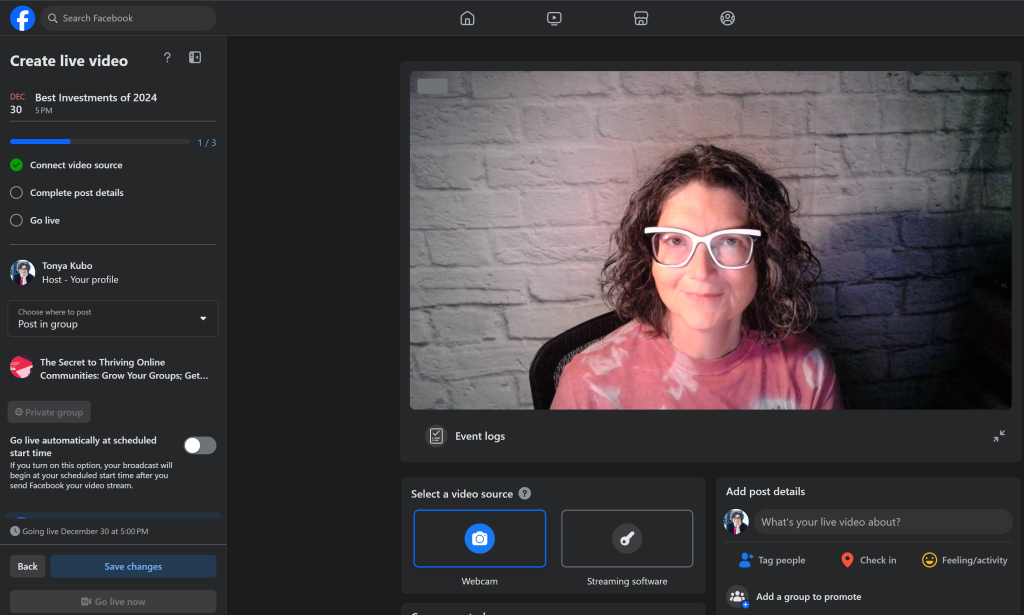
While Facebook Live Producer lacks the polish of third-party streaming services that support branded frames and lower-thirds for your livestream, it works well within Facebook groups, doesn’t cost a dime, and doesn’t require much technical skill or training.
Video Resources for Community Managers
They say a picture is worth a thousand words, but nothing compares to video when it comes to building meaningful relationships with people you have never met in real life.
Video helps to build deeper connections within communities because tone is hard to read via typed text. What is written with the intent of wry wit by one person can be perceived as judgmental, sarcastic and outright mean to another.
If you love video, you probably already have a favorite app or software program. For several years (2019 to 2024), I swore by StreamYard for live video streaming throughout social media. Since, their major price increase in 2024, that’s no longer the case.
Facebook’s decision to close its API for Groups in April 2024 reduced the value of third-party livestreaming apps for most community managers. Third-party apps are still the way to go for multi-streaming (livestreaming to multiple platforms at the same time) on public-facing properties (Facebook Page, YouTube Channel, LinkedIn Profile, etc.). But if livestreaming into your group is your top priority, the investment in a third-party application might not make sense.
Facebook Live Producer
Recommending Facebook Live Producer for livestreaming in Groups or elsewhere on Facebook is not something I thought I’d do again since the feature went wonky for me back in 2020. For two straight years, I couldn’t access the feature at all. But with the API closure, I had to learn to make it work – especially when testing consistency around going live every day.
The biggest benefits of Live Producer are that it’s free and easy to initiate from computer or mobile device.
Other benefits:
You can pin a comment to the top of the comments feed under your video (great way to highlight a call to action)
You can schedule your livestream in your group as an event
Issues I have with Live Producer:
You can’t have an on-screen guest if you livestream from your computer. To livestream with a guest, you must initiate the livestream from your phone. Your guest must be watching the livestream from their photo to request to join the broadcast or for you to invite them to join the broadcast with you. Sound annoying? It is.
You can’t toggle back and forth between direct-to-camera and screen share. If you want to share your screen for a tutorial, you must initiate that before the broadcast begins. This is the feature I miss the most with third-party apps.
Even if you type out a title and description before you go live, you have to do it again when you initiate the broadcast — and the formatting doesn’t stick. You have to edit the post after the livestream ends to add spaces between paragraphs and any other formatting you want.
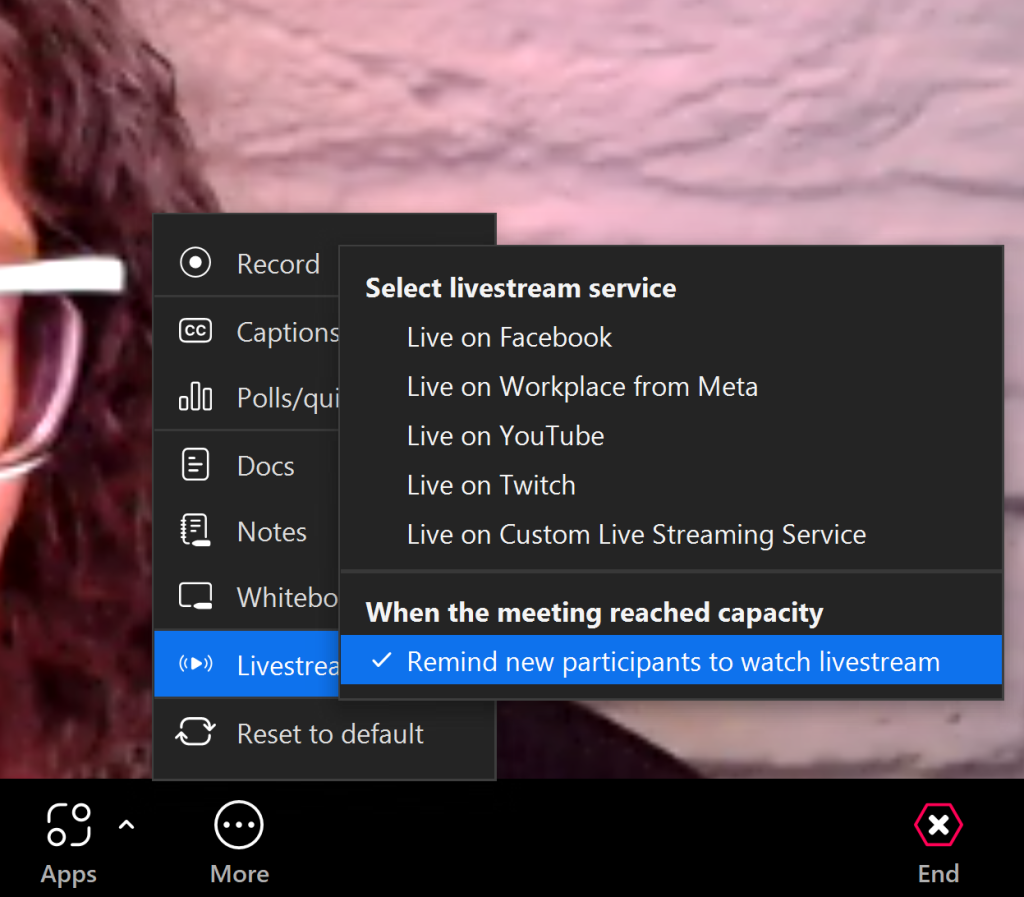
If you’re already paying for Zoom, explore its livestreaming options to see if they meet your needs. It’s fairly easy to connect Zoom to your Facebook Page, YouTube and Twitch channels. The “Custom Streaming Service” option will allow you to use RTMP to stream into a Facebook group.
Zoom
I don’t love using Zoom for livestreaming into Facebook groups, but if you want to stream from your computer, toggle back and forth between looking at the camera and sharing your screen, or having one or more people on camera with you, it’s a solid option.
I wouldn’t invest in a Zoom account strictly for livestreaming purposes but if you’re already paying to use it for meetings or webinars, learning to use it for livestreaming further maximizes your investment.
Going live to a Facebook Page, YouTube channel or Twitch account is as easy as connecting your accounts and clicking a button from within a meeting. But if you want to go live in your group, you’ll need to select the “Custom Streaming Service” feature, which uses RTMP to connect your Zoom meeting to a livestream within your group.
If production quality and audio/visual effects are important to you, check out OBS Studio. It’s free and if you’re willing to spend time learning how it works, it can do a lot for you.
Loom
The joke around here is that I speak fluent Loom, because I send so many videos using Loom. I’ll send direct-to-camera videos in response to emails I receive, and I record a lot of tutorials using Loom because the service is so easy to use. To date, I’ve recorded and shared almost 2,500 videos using Loom. Whether I’m offering feedback to a client, providing a tutorial or starting a conversation, Loom makes it easy to do from my phone and my computer.
Loom hosts your videos and tracks views while allowing viewers to leave comments as well. You can trim, edit and embellish your videos – all within the app. And, you can download your videos to upload to various platforms such as Facebook and YouTube.
In 2024, I tested Zoom Clips as a replacement for Loom to see if I could simplify my tech stack. While Zoom Clips was just as good at recording videos as Loom is, it falls short in additional features. What I have always appreciated about Loom is that I could also upload recordings to share with others. Zoom Clips lacks that capability. Zoom feels more like an internal recording tool, not one that’s meant for external audiences.
Email Marketing Services
Email marketing services allow you to send professional mass emails to your community members in compliance with anti-spam laws. Services like this are critical if you’re sending out newsletters, sales emails or are trying to build up an email list for business purposes.
But they are also a powerful way to connect with your online community members outside of your group, which is important if the community is hosted on social media. You never know when Facebook, LinkedIn or a similar platform will go down or be unavailable. I value having email access to my group members. In The Secret to Thriving Online Communities, we even have a specific email onboarding sequence that goes out to new members and establishes that direct line of communication.
Kit (formerly ConvertKit)
Kit has been around for AGES but has made significant advances in its level of service recently. I started using Kit in 2016 when I had only 45 email subscribers. I was frustrated by MailChimp and looking to make a switch. Even though they didn’t have a free plan at the time, Kit’s customer service and stability made them worth the investment. I’ve never looked back.
Nowadays, they have various tiers that work at just about any stage of business. The freemium plan is fully functional up to 300 subscribers. I’m seeing a lot of authors, podcasters and livestreamers go all-in on using Kit to connect with their audiences. It’s just as valuable for product-based business. They have great starter templates and a variety of features to allow you to customize your subscriber experience. They also have the Creator Network for collaborative list-building efforts. In 2024, 774 people subscribed to my email list through Creator Network referrals — making this the best passive list-building tactic I’ve ever tried.
What I’m especially excited about at the moment is the Kit App Store. Seamless integration with Canva, Giphy, Senja are streamlining my workflow. When you shop the App Store, make sure to look at “legacy integrations.” Community leaders will be thrilled to see integrations with Circle, Mighty, MemberPress and MembersPro.
Mailerlite
I don’t LOVE Mailerlite, but many of my clients do. Sadly, like a lot of email marketing services, they’ve dramatically reduced the value of their free account tier. So much so, I’m almost exclusively recommending Kit now. But if you prefer a simple interface and solid drag-and-drop builder (something Kit doesn’t do well), you should investigate Mailerlite.
Social Media Scheduling Tools for Community Managers
I’ve used at least 100 social media schedulers over the years. Between my work as a social media manager for a major research university, an agency owner, solopreneur and fractional CMO, I have put every tool through its paces. I believe most schedulers do one thing best or work with one platform best and do everything else “meh” — so get clear on your priorities before committing to any paid plan.
As a people-first community manager, I have a different perspective on social media schedulers. I don’t use them so I can “fix and forget” my social media plan. I use them to publish content when my audience is most apt to see it, so that my time is freed up to develop meaningful relationships across social media. By scheduling my posts, I can spend more time responding to comments and commenting on other people’s posts.
Meta Business Suite
Since Facebook closed its Groups API in April 2024, most third-party apps won’t auto-publish posts into your Facebook group. That makes native scheduling of content within your group and Meta Business Suite as your top two options for scheduling community content.
Meta Business Suite has finally integrated all content creation and scheduling tools to provide a pretty good level of service for scheduling to Instagram and Facebook, and moderating your comments. Best part? It’s still free.
The cost of free in this case is basic functionality. Here is what you can do through Business Suite:
Schedule posts to Facebook Pages, Groups, and Instagram accounts (including Reels, Stories and videos)
Schedule Carousels to Instagram
Customize the text of your post, so your caption on Facebook differs from your caption on Instagram when cross-posting
Get recommendations for the best times to post on Facebook and Instagram according to when your followers are most active
Access analytics on post performance (even if you didn’t schedule the post through Business Suite)
What you can’t do:
Schedule the first comment to publish with the post
In-depth hashtag research
Schedule content to platforms Meta doesn’t own
If your preferred social media platforms are owned by Meta, Business Suite might be all you need for scheduling your content at the moment.
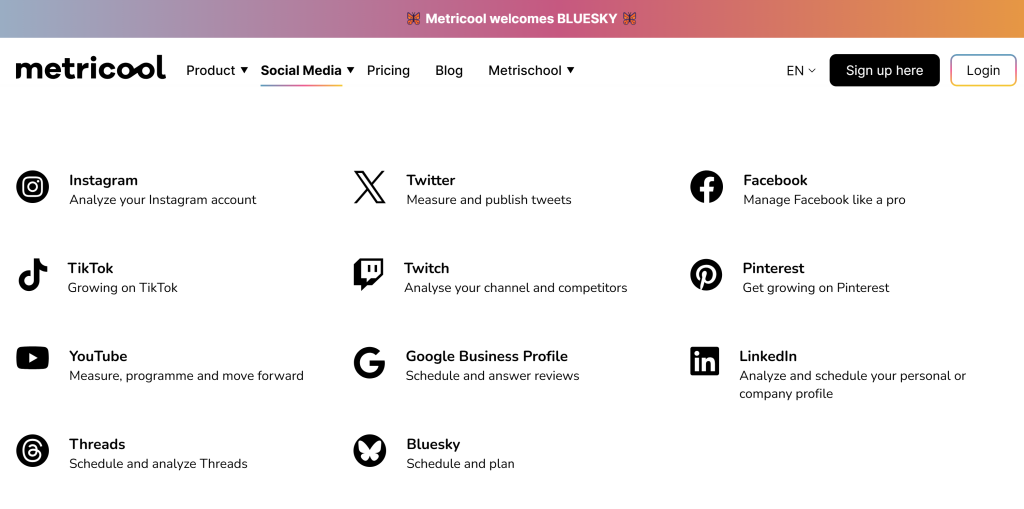
For the price, Metricool integrates with a robust list of social media platforms, including Instagram, TikTok, YouTube, Threads, Twitter (X), Twitch, Bluesky, Facebook, Pinterest, LinkedIn, and Google Business Profile.
Metricool
I switched from SmarterQueue to Metricool in Fall 2022 because I love the integrated dashboard that combines analytics from my website with all connected social media properties. I also find its scheduler to be more reliable, while still allowing for posts to be recycled on a loop.
I use the paid plan, which allows me to schedule to my LinkedIn profile. Unfortunately, analytics are only available for company pages on LinkedIn. I like that I can schedule both my post and the first comment on Facebook, Instagram, and LinkedIn. If you don’t have graphics or images of your own, you can access their image library to illustrate your posts. Recently they have added AI copywriting to help improve the quality of posts and direct integration with Canva and Google Drive to make accessing your own images even easier than before. In 2024, they added several platforms to the list of supported channels (e.g. TikTok, Threads, Bluesky, Pinterest).
Tailwind
If Pinterest is part of your marketing strategy, you need to take a close look at Tailwind. No service is better at executing an effective Pinterest strategy. I don’t care for how it manages scheduling to other platforms but if your brand is Pinterest-forward, it makes sense to fully embrace Tailwind as your social media scheduler.
Productivity Tools to Support Community Managers
As a service provider, I have a lot of experience with productivity tools. I’ve tried several personally and professionally. Whether they are tools my team and I use in our business, or tools our community management clients use in working with us, the choices are numerous.
I believe you are your most important system. The best productivity tool for you is the one that plays nicely with your brain. You may have to try a few to find the right fit for the work you do, but once you make a decision, the time saved is exponential.
News Feed Eradicator
If you find yourself distracted by the overwhelming amount of content on your social media timelines, News Feed Eradicator will be your best friend. This free Chrome Extension wipes your news feed clean, so you can focus on the task at hand. It works on every major social media platform, including Facebook, Twitter, YouTube, Instagram, Reddit, LinkedIn and more.
You can turn on the eradicator for a limited amount of time if you’re doing deep work on social media, or keep it on all the time to take control over your news feed.
GroupTrack CRM
My people-first approach to community management is made possible at scale thanks to GroupTrackCRM, which works on Facebook, Instagram and LinkedIn to keep track of conversations, ensuring nobody falls through the cracks.
We use GroupTrack for our high-touch member onboarding experience in The Secret to Thriving Online Communities, and I also use it to keep track of people I connect with all over Facebook (friends, page followers, peers, etc.). The bulk messaging feature allows me to stay in touch with people via DMs without landing in Facebook jail. GroupTrack is a great tool for anyone who wants to tighten up their process for cultivating leads via social media.
Basecamp
Basecamp is a web-based project management and collaboration tool that our team uses to manage work and communicate with our clients and each other. It offers a variety of features that can increase productivity, including task management, communication (direct messaging, group chats and message boards), file sharing and scheduling. Customize Basecamp by integrating it with other parts of your tech stack, like Proposify, Toggle, Timeshift Messenger and HoneyBadger.
Having one service to manage internal and external communication and project management has saved hours for my team. We’ve been able to eliminate weekly meetings and can now successfully achieve our goals by working asynchronous to one another. The functionality of the mobile app is just as convenient as the web app, critical for anyone who conducts business on the go.
Asana
Asana is a web-based project management tool that is designed to help teams organize and manage their work. Though you can view tasks as a kanban board, Asana is great if you’re a list person. It creates to-do lists, assigning tasks to team members, setting due dates and tracking progress.
Asana has been around so long that it integrates with most popular tech tools online business owners and community managers rely on. Slack, Microsoft Teams, Vimeo and Google’s suite of services are just a few. If you’re going to use Asana for project management, I strongly encourage you to add on Slack for internal communication. Otherwise, you’ll end up buried in meetings or email when you need to brainstorm ideas.
Slack
Slack is a cloud-based team communication and collaboration tool that provides real-time messaging, file sharing, and group chat features. It is designed to improve team productivity and streamline communication. Slack makes work easier by including all members of your team in discussions, regardless of locations.
The best remote teams I’ve been on use Slack for internal communication. I’ve also used Slack as a community platform. Not everyone likes Slack’s user interface, but if you take the time to organize your workspace in a logical manner, teach your team to use it effectively and hold everyone accountable to using it as designed, you’ll quickly come to love it. Slack integrates seamlessly with Zoom, Google, Asana, GIPHY and Loom (along with hundreds of other software resources).
Liz Wilcox’s Email Marketing Membership makes it easy to connect with members of the online communities you manage.
Courses, Memberships, Products and Programs
Community management isn’t just a matter of running a Facebook Group or two. To have a thriving online community, you need a variety of other skills: building and nurturing your email list, graphic design, video production, and an understanding of search engine optimization (SEO), online learning and content management. You can hire service providers to do these things for you or enroll in programs that help you do them yourself.
This is not an exhaustive list of the programs I credit for helping me to get to where I am, but they are programs that solve what I think are some of the biggest problems facing community managers.
Liz Wilcox’s Email Marketing Membership (EMM)
If you’re using your community for lead generation, you need a way to connect with them outside of the group. Email is the best way to reach your members. Getting their email address is the first step but once you have email addresses for your members, what’s next? Ideally, you’ll start emailing them regularly so they get used to hearing from you in both places. But it can be hard thinking of what to say in those emails.
Enter the Email Marketing Membership (EMM) by *NSYNC-loving Liz Wilcox. For only $9 per month, Liz will send you an email template and video explanation of how to use it every week. Her membership portal has a variety of workshops on how to grow your email list and turn followers into friends and clients. The membership includes a private Facebook community for team and peer support.
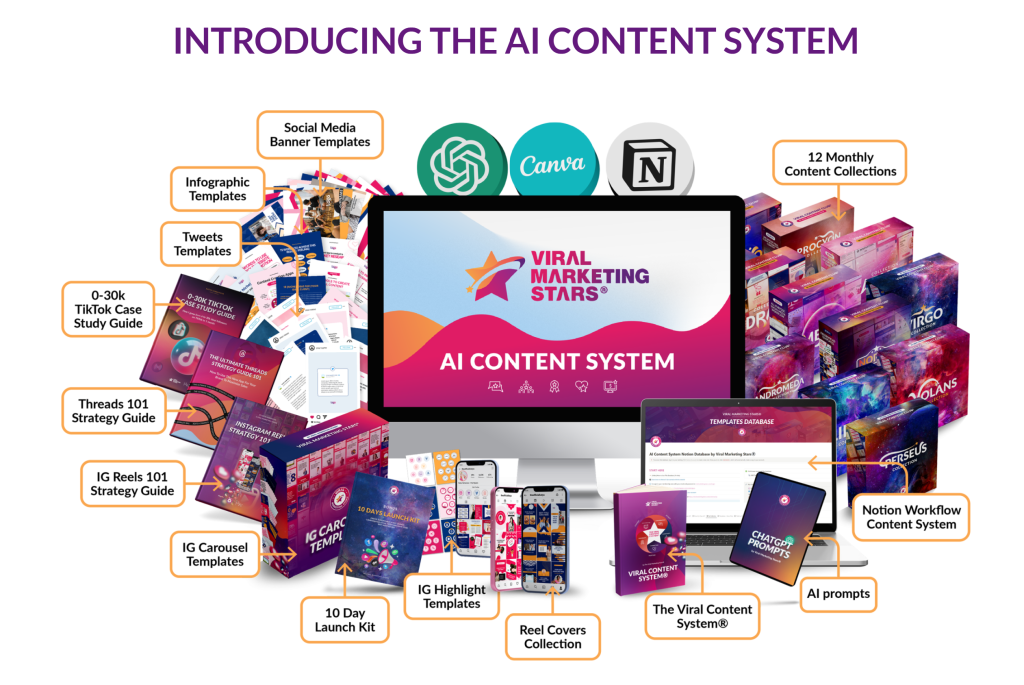
The AI Content System by Viral Marketing Stars includes the Viral Content System® Strategy, 12 Monthly Content Collections with templates, captions & calls to actions, AI Notion workflow with all the templates + captions + call to actions pre-loaded, AI ChatGPT prompts & step-by-step customization for your niche, and a variety of additional bonuses.
AI Content System (Viral Marketing Stars)
Design is not my gift but hiring a designer for social media content isn’t practical. Professionally designed graphics average $14 apiece. At that rate, a package of 15 images would cost $210. That’s a steep price tag for social media posts with an average shelf life of a few hours.
So how do you get compelling graphics to slow the scroll on social media without breaking the bank? The AI Content System from Viral Marketing Stars is my recommended solution. The Viral Content Club, a Canva template subscription, is my solution. I first entered the Viral Marketing Stars ecosystem in 2016 when I was first learning livestreaming from founder Katya Varbanova. Since then, I’ve leaned on Katya’s digital products for a variety of reasons. I still rely on these Canva templates for everything from Facebook cover images and Instagram posts to YouTube thumbnails and infographics.
OnVideo
This video membership is helpful if TikTok, Reels or YouTube Shorts are part of your marketing strategy. OnVideo is Elise Darma’s membership focused on short-form video content.
Every week, you get five short-form video ideas and caption templates for TikTok, Reels, Shorts and Idea Pins. They are adapted to a variety of business models, whether you sell coaching, services or products. These video ideas are also great if you’re looking for quick videos to post in your community.
The Playhouse
The Playhouse is a collective of creative solopreneurs that launched in 2024 with a simple goal: to help members expand their network and visibility in fun, collaborative ways.
The Playhouse is built on the foundation that we’re all leaders and learners. Mentors in our unique zone of genius, whether it’s business skills like design, copywriting, marketing, or life skills like body liberation, breathwork, or learning how your birth chart can affect your capacity.
As a Playhouse mentor, I host ask-me-anything and tutorial sessions each month. I have also built strong collaborative relationships with other members of the Playhouse. Even in the short few months I’ve been part of The Playhouse, I’ve found both service providers and clients from within the community.
What I enjoy most about The Playhouse is while there are several events hosted each month, none are recorded. This prioritizes live participation and makes each event truly special. The Playhouse is hosted on Heartbeat and events are hosted using GoBrunch. It’s a different experience, for sure, but one that is well-suited for anyone seeking human-to-human connection in their online business efforts.
Attract & Activate
I’ve been working with Meg Casebolt and the Love at First Search team since 2020. I’m an Attract & Activate alumna and I hire the team each year for an SEO Roadmap.
Attract & Activate, delivered live twice each year, is the first course that made search engine optimization and keyword research make sense to me. Once I understood how SEO worked, I also understood what a beast it can be to do well. Hiring Meg’s team for my annual SEO Roadmap means the heavy lifting is done by professionals. The team does the keyword research for me based on my goals for the year, and provides me with a list of keywords to target and articles to write to support ranking for those keywords. If you found this article from an online search, you have the proof of the Love at First Search team’s success.
Additional Resources for Online Community Managers
Canva
Canva is a web-based graphic design platform that allows users to create a wide range of visual content, including social media graphics, presentations, posters, flyers, videos, and more. The interface is user-friendly and the template options are vast. Even with no design experience, you can create professional graphics quickly and efficiently.
Canva was one of my earliest business investments, and it gets better every year.
Google Workspace
Most community managers aren’t working deeply under the hood of the businesses they support, but sometimes our work with clients identifies deeper operational issues that need fixing so we can be most effective. Though it doesn’t happen often, I’ve worked with clients who have achieved significant business success without fully building out business systems. These clients, usually solopreneurs (maybe supported by a VA), are running their business through a personal email account and free cloud storage.
In these situations, I recommend Google Workspace’s Business Starter or Standard Plan. I use the Standard Plan because my work requires the 2TB pooled storage and the included Appointment Bookings Calendar and eSignature with Docs and PDFs have allowed me to cancel my Calendly and Adobe subscriptions. Google Workspace is a robust suite of tools that supports professional communications, scheduling, and data storage and management. And if you want to fully appreciate all that Google has to offer you and your business, I highly recommend Adrienne Farrow’s Go-To Community. Adrienne is my personal Google expert and the reason I’ve been able to streamline my tech stack.
MemberVault
When I launched my first online course in 2018, I looked everywhere for an easy, affordable learning management system. MemberVault caught my eye because it was the first to offer a marketplace dashboard that displayed free and paid offers side-by-side.
You can use it for coaching, consulting, courses, memberships, digital products, and even podcasts. I’ve tried other LMS platforms over the years but keep returning to MemberVault. Nothing compares to the value at this price.
Want Help Choosing Community Management Resources?
Team Kubo specializes in online community design, development and growth. Whether you need help with strategy, training your admin team or day-to-day management of your group, we can help. The first step is to complete our no-cost community health assessment, so we can identify your needs and customize a plan to get the results you desire.
It’s hard to talk about online communities without discussing strategies to monetize your Facebook group. Many community leaders start off with a Facebook group because it’s a free community platform that is easy to figure out. But before long, everyone realizes running a thriving online community takes time. Before long, you’ll start to wonder what you can do to offset your expenses.
If you started your Facebook group for business purposes, you might already have some ideas on how you want to make money there. But non-business groups can make money, too.
In this article, I’m sharing six effective ways to monetize your Facebook group. From sponsored posts to digital product sales, you’ll learn how to make the most of your group and start generating revenue.
Sponsored posts and product reviews are one of the most popular ways to monetize a Facebook group. They are forms of paid advertising where a business or brand pays a content creator to promote their products or services.
In the case of Facebook groups, the content creator is typically the group owner or manager. A sponsored post is a post that explicitly mentions the sponsor and promotes their products or services. This can be in the form of a text post, image, or video.
On the other hand, a product review is a detailed evaluation of a sponsor’s product or service by the content creator. This can include the features, benefits, and drawbacks of the product or service.
In both cases, the sponsor pays the content creator a fee for the promotion, which can be a fixed amount or a commission on sales made through the promotion. Sponsored posts and product reviews can be a lucrative way to monetize a Facebook group and can benefit both the sponsor and the group’s members by providing valuable and relevant content.
To make the most of this monetization idea, it is important to be transparent about your sponsorships and only promote products or services that are relevant and valuable to your group’s members.
With effective sponsored posts and product reviews, you can build a profitable and engaging community that benefits both you and your audience.
Where to Find Sponsors and Products to Review
There are several ways to find sponsors or products to review for your Facebook group. Here are a few ideas to get you started:
Reach out to brands or businesses you already know and love, or that your group members know and love. If you know your group members well, you should have a good idea of what will appeal to them. You can contact the company via email or social media to pitch your sponsored post or product review idea.
Ask your members! Find out what products or services your members are curious about and send a pitch to those companies.
Attend industry events or conferences related to your group’s niche to meet and network with potential sponsors or product partners.
Remember to choose sponsors or products that align with your group’s values and interests and provide value to your audience. This will ensure that your sponsored posts and product reviews are well-received and beneficial to both you and your group’s members.
Though sponsors tend to favor large groups for sponsored posts and product reviews, don’t underestimate the power of a highly engaged group with a defined focus. Most advertisers understand exposure to 500 ideal clients in a highly engaged group is going to yield better results than a group of 50,000 with very little activity.
How to Charge for Sponsored Posts or Product Reviews
The amount you should charge for a sponsored post or product review in your Facebook group can vary depending on several factors, including the size of your group, the engagement rate of your audience, the niche you’re in, and the type of content you’re creating.
The group owners I know and work with usually offer packages for sponsored posts or product reviews according to the factors mentioned above. Two posts and a video usually run $300 to $500, and the package rates climb if they include mentions on high-traffic websites or podcasts. For product reviews, you may want to consider charging a higher fee since it involves more time and effort to create detailed evaluations of the product or service.
Some sponsors won’t pay for reviews but will give you an affiliate link that allows you to make a commission on sales that come through your promotion (also known as affiliate marketing). I’ve seen commission ranges between 2% for high-end sewing machines to 50% on software services.
Ultimately, the amount you should charge for a sponsored post or product review should be fair and reasonable based on the value you’re providing to the sponsor and your audience. It’s also a good idea to do some research and see what others in your niche are charging for similar content in similar-size groups to get an idea of the going rates.
Idea #2: Affiliate Marketing
Affiliate marketing is another effective way to make money with Facebook groups. It involves promoting products or services related to your group’s niche and earning a commission on sales made through your referral links.
Affiliate marketing is considered a performance-based marketing strategy because you only get paid when someone makes a purchase. This strategy is appealing because it doesn’t require you to create your own products or services to make money. It also lends itself well to groups that aren’t specifically focused on business because everyone loves recommendations from people they trust. And your group members know you well enough to trust you.
To get started with affiliate marketing, you can join affiliate networks such as Amazon Associates, which offers a wide range of products and services to promote. You can also approach individual brands or businesses and ask if they have an affiliate program you can join.
To be successful with affiliate marketing, it’s important to choose products or services that are relevant and valuable to your group’s members, and to promote them in a way that is genuine and not overly salesy. Nothing drops the value of a Facebook Group faster than overwhelming the feed with affiliate promo posts.
Using Affiliate Marketing to Make Money with a Facebook Group
In The Secret to Thriving Online Communities, my free Facebook group, I have a subtle resources page with a variety of affiliate and non-affiliate links for products and services I know and love that are relevant to my community members. For example, we have affiliate links to:
We also have non-affiliate links to other social media schedulers and software tools. It adds value to the group by providing members with a centralized location for my recommendations and offers an additional revenue stream for my business. With the right approach, affiliate marketing can be a lucrative and passive way to generate income from your Facebook group.
The key to successful affiliate marketing is to choose products or services that are relevant and valuable to your audience and to promote them in an authentic and genuine way. You should also be transparent about your use of affiliate links and always disclose that you may earn a commission from any resulting sales. With effective affiliate marketing, you can earn passive income from your Facebook group while providing value to your audience.
Idea #3: Group Membership Fees
Another way to monetize a Facebook group is by offering a membership fee for exclusive content, resources, or perks. This idea is different from using Facebook as the exclusive home of a membership program or the community component of a membership program.
With this monetization idea, you offer a premium experience to your group members that goes beyond the free content and discussions that are available to everyone. The membership fee can be a one-time payment or a recurring subscription, and it can provide access to content such as premium articles, videos, or webinars, as well as personalized support or discounts on related products or services.
The idea here is that everyone can join the group for free but those who pay the fee get access to content free members do not. For instance, the Women Helping Women Entrepreneurs Facebook Group is a free community with 661,000 members. For $97 per month, though, members can get featured and promoted in the group as part of the Stand Out Online upgrade.
This is a great idea if you’ve been considering a paid Facebook Group but don’t want to manage multiple groups. Instead of leading a free group AND a paid group, you have one group with two or more tiers of benefits. You’ll have the added investment of creating the premium content but you won’t have the additional overhead of managing a second community or hiring help to manage the community for you.
To make the most of this monetization idea, it’s important to provide real value to your paying members and to promote the benefits of the membership fee in your group. You need a clear line between what is free and what comes with the fee, and there should be a big enough gap between the two to justify the added investment.
You can also use this opportunity to build a more engaged and dedicated community within your Facebook group. Membership fees can be a reliable and recurring source of income for your Facebook group while providing additional benefits to your most dedicated followers.
Idea #4: Digital Product Sales
If you want to make a business out of your community, digital products are another popular way to monetize a Facebook group. These can include ebooks, self-study courses, webinars, templates, or any other digital product that is related to your group’s niche or interests.
The advantage of digital products is that they can be created once and sold repeatedly, making them a scalable and semi-passive source of income. This monetization strategy requires some technical skill to deliver. Though you can promote the product(s) in your group, you’ll need a sales page on your website and automation for delivery to make the process as seamless as possible for you and your consumers.
In Team EBG, Lizzy Goddard promotes all of her self-study courses and resource bundles, among other things. In Clutter Free Academy, Kathi promotes all of her decluttering books and ecourses. In the Working Homeschool Mom Club, Jen promotes her printables, planners and ecourses.
How to Promote Digital Products in Your Group
If you already have digital products for sale, why not promote them in your Facebook Group? This is an effective way to make money in the group without too much effort on your part. Here are some steps you can follow to promote and sell digital products in your Facebook group:
Choose the right product — Make sure the digital product you are promoting is relevant to the purpose of your group and valuable and helpful to your members.
Create a sales page — You need a point of sale beyond the posts in your group. Create a landing page on your website that promotes your product, provides all the relevant information, features, and benefits AND has a BUY button so people can make the purchase.
Create a promotional plan — Too much promo in a group wears members down quickly. Develop a promotional plan for your group to space out product promotions between periods of value-focused content. Use a calendar to ensure you’re selling often enough throughout the year to meet your goals while still having space to nurture members through non-sales content as well.
By following these steps, you can effectively promote and sell your digital products in your Facebook group, which can help you monetize your group and provide value to your audience.
To make the most of this monetization idea, I can’t emphasize enough the importance of only promoting digital products that are relevant to the purpose and needs of your group. With effective digital product sales, you can turn your Facebook group into a profitable and sustainable business that provides value to your audience.
Idea #5: Services
Promoting your services in your Facebook group can be a lucrative way to monetize your group while providing value to your audience. Services can include coaching, consulting, or freelancing. The advantage of promoting services is that you can leverage your expertise and knowledge to help your group members achieve their goals or overcome their challenges.
For most business owners, services are their highest-price offer, which is why I consider this to be the most lucrative option when it comes to monetizing your group.
To promote your services in your Facebook group, you can share your expertise and insights through valuable and relevant content, such as articles, videos, or webinars. You can also offer limited-time discounts or promotions to your group members to encourage them to work with you. It’s important to be transparent and clear about your pricing and availability and to provide excellent customer service and follow-up to ensure the satisfaction of your clients. With effective promotion and delivery of your services, you can turn your Facebook group into a profitable and rewarding business that helps you build a loyal and engaged community.
Promoting Your Services Without Being ‘Salesy’ or Weird
Promoting your services in your Facebook group can be a delicate balancing act between providing value to your audience and not coming across as what my friend Molly Mahoney calls a “salesy weirdo”. Here are some tips to promote your services in your Facebook group without being pushy or annoying:
Provide value — Focus on providing value and building trust with your group members by sharing useful and relevant content, such as articles, videos, or webinars that are related to your niche or area of expertise. This can help position you as an authority and someone who genuinely wants to help others. In The Secret to Thriving Online Communities, for instance, I host weekly live workshops but I usually only make offers during those workshops once a month.
Be authentic — Be yourself and show your personality and passion for what you do. This can help you connect with your audience on a deeper level and build relationships that can lead to future business. GroupTrack CRM co-founder Jenna Larson hosts a weekly product tutorial in their free group each week and usually promotes services monthly to help members get more from their product.
Tell stories — Use storytelling to convey the benefits of your services and how you’ve helped others achieve their goals or overcome their challenges. The best sales come from case studies, where you take the time to help people understand the practical application of the services you provide.
Provide social proof — Share testimonials or case studies from satisfied clients to provide social proof and demonstrate the value of your services. Do this regularly, not just when you’re trying to sell.
Avoid being pushy — Avoid constantly promoting your services or asking for business in your group. Instead, focus on building relationships and providing value 80% of the time. Don’t sell more than 20% of the time.
By following these tips, you can effectively promote your services in your Facebook group without coming across as salesy or weird, while making your group a profitable and rewarding business.
Idea #6: Merchandise
If you have a group with a strong culture or sense of community identity, selling merchandise might be a fun way to monetize your Facebook group.
Selling merchandise can be a lucrative way to monetize your group as it allows you to leverage your brand and community to promote your products. Though some group leaders like to send free swag, you’d be surprised by how many members would pay for t-shirts, mugs, or stickers that identify them as a member of your community.
The best example I’ve seen of this is Jen Hatmaker’s #The4500, which wasn’t even started by Jen. #The4500 references the 4,500 applicants who were not picked by Jen’s publisher to be on the official launch team of her book, For the Love. One person took matters into her own hands and ended up being the leader of the rogue launch team and is now forever BFFs with Jen as well. Today, Jen’s branded merch includes everything from socks and shirts to journals and stickers.
Though you can create an online store on your website using a service like Shopify to sell your merchandise, companies like CustomInk and Bonfire allow you create limited-edition campaigns that drive up interest without requiring long-term maintenance or oversight.
To make the most of this monetization idea, it’s important to create high-quality products that are relevant and appealing to your group’s members. You can also use this opportunity to build a deeper connection with your community by creating products that resonate with their values and interests. With effective merchandise sales, you can turn your Facebook group into a profitable and sustainable business that showcases your brand and provides value to your audience.
Quick Summary of Facebook Group Monetization Ideas
To recap, here are six monetization ideas for your Facebook Group:
Sponsored Posts and Product Reviews — Businesses pay you to promote their products or services in your Facebook group.
Affiliate Marketing — Promote relevant products or services and earn a commission on any resulting sales made through your unique referral link.
Group Membership Fees — Charge a membership fee for exclusive content, resources, or perks in your Facebook group.
Digital Product Sales — Create and sell digital products such as ebooks, courses, webinars, or templates related to your group’s niche.
Services — Promote your services, such as coaching, consulting, or freelancing, to your Facebook group members.
Merchandise — Sell physical products such as t-shirts, mugs, or stickers that are related to your group’s niche or interests.
By using one or more of these monetization ideas, you can turn your Facebook group into a profitable and sustainable business that provides value to your audience. Monetizing your Facebook Group doesn’t have to be scary or overwhelming. The key is to choose monetization ideas that align with your group’s niche and interests and provide real value to your members while maintaining transparency and authenticity in your promotions.
Want Help with Your Group Strategy?
Team Kubo specializes in online community design, development and growth. Whether you need help with strategy, training your admin team or day-to-day management of your group, we can help. The first step is to complete our no-cost community health assessment, so we can identify your needs and customize a plan to get the results you desire.
Are you feeling the LOVE in your online community right now?
Whether you host free or paid groups (on or off Facebook), you have to care for your members if you want them to care for you in return.
In this article, you’re going to learn how to care for your group and make your members feel seen, known and loved.
Before we go too much further, do this exercise: Think about the online communities you participate in, the ones you love, the ones you don’t and the ones that fall somewhere in between — the ones that are “meh.”
Are you thinking about them?
Now, think about what sets them apart. What is it about the ones you love that make you love them so much?
Ideal online communities provide members with an opportunity to connect with the leader, the content, and each other.
But connection is subjective. Too often, I hear from exhausted community leaders who feel like running their group takes more work than pushing a boulder uphill. They feel like they are suiting up and showing up, providing their absolute best and getting absolutely nothing in return.
Crickets…
We have all been there…it’s normal for groups to experience quiet seasons.
But when it stretches beyond a season, you have a problem. And if you have this problem, you know you need a solution.
The Love Languages of Online Communities
Take note: Details Matter.
More than a hat tip to the Amazon Original series, Reacher, this is the honest truth.
If you want a highly engaged online community, you have to pay attention to the details. The problem is most community leaders don’t pay attention to the right details.
If you’ve read The Five Love Languages, you know that there are five different ways for humans to feel and express love:
Words of affirmation
Acts of service
Receiving gifts
Quality time
Physical touch
Though you can’t directly apply the five love languages to online groups, you can use the concept to understand what will and won’t foster community and engagement among members.
The first thing to do is figure out what motivates most members to join and stay in your group. If you don’t know, ask.
If you lead a Facebook Group, you can make it one of your three screening questions members have to answer before they join. You can serve them better when you know what pain they are trying to soothe when they join. You can also post a poll in your community, asking either why folks joined or what keeps them around.
Once you know what attracts members to your group, you can align your offers in the group with what is most appealing.
No need to martyr yourself for the group. Look for overlap between what you want from your group and what they want from you. Then, show up in ways that benefit you AND them.
Case Study: The Secret to Thriving Online Communities
In The Secret to Thriving Online Communities, my free Facebook Group, I know members show up because they want authentic relationships with their group members. Though they want to expand their reach by increasing brand awareness, growing their email lists and developing a bigger social media presence, they don’t want nameless/faceless followers. They want to connect with followers as much as they want their followers connected to them.
Knowing that about my community means I also know they won’t stick around if they feel nameless or faceless to me. It matters to them when I remember details.
Details like Meghann Guentensberger’s nonprofit devoted to the memory of her daughter, Rylie. Or that Jen Mackinnon lives in Nova Scotia and typically watches my weekly workshops on replay because the live broadcast takes place after she’s in bed.
Members feel loved when they see how I pay attention, and that’s what keeps them coming back for more in our group.
What keeps your members coming back to your group?
How to Increase Engagement in Your Online Community
Here are some ideas to make your members feel seen, known and loved — and to increase engagement while you’re at it:
Lead Q&A sessions around topics of interest to your members
Facilitate connections between members by tagging members in comments to invite them to share their thoughts
Respond to members’ posts and comments promptly and offer helpful suggestions relevant to their specific situations
Create resources for the group based on common questions
Celebrate members’ accomplishments, especially when individuals are stretching outside of their comfort zones
Recognize your most engaged members each month, celebrating their contributions to the group
Making group members feel seen, known and loved isn’t a hit-and-miss endeavor. It takes consistent time and effort, but by following these tips, you can create a thriving community that your members find too valuable to ignore.
Need Help with Your Community?
Team Kubo specializes in online community design, development and growth. Whether you need help with strategy, training your admin team or day-to-day management of your group, we can help. The first step is to complete our no-cost community health assessment, so we can identify your needs and customize a plan to get the results you desire.
Wondering whether you’re doing your best to post engaging content for your Facebook Group? Unsure of whether anybody sees or cares to see your posts?
If you want an engaged community or Facebook Group, you have to give members something engaging to respond to — so they can have direct two-way conversations with you and with each other.
But to do that, you need a plan. Not just any plan either. You need one that meets the needs of you and your group. You deserve to feel good about what you are doing and confident you’re doing the right things at the right time.
As the owner of Team Kubo, an online community management agency, I help people design highly engaged groups and train others to do the same. It also means I plan A LOT of content for A LOT of groups. If I seem better at it than you, it’s not because they taught this stuff in college. It’s because I’ve done more of it for a lot longer than you have. With practice, comes progress.
In this article, I’m sharing what I’ve learned over the years about how to plan content for groups to drive engagement and get results.
How to Plan Engaging Content for Your Facebook Group
If you want to plan content in a way that’s efficient and effective, you need a foolproof system that includes the following steps:
1. Get a mechanism to collect your ideas
Ideas of what to share with your community can strike any place and any time. Figure out how to collect ideas when they come now so you don’t find yourself with a great idea and no way to remember it when it’s time to write. The easiest low-tech solution is to carry a notepad and pen in your purse or pocket to jot down ideas that come up when you’re on the go. If you’re someone who’s never too far from your phone, though, a voice memo or notes app might be more convenient.
2. Pick one method for writing your posts
Routines support consistency, so pick one method for writing your posts and stick with it. I prefer a Google Doc because it’s easy for me to use either from my computer, phone or tablet, and I like the document interface. If Google Docs don’t work for you, you can use Word Online, Dropbox Paper or a note-taking app like Evernote.
What’s important is not losing track of your best ideas.
3. Commit to a scheduling system for your content
Community engagement comes down to value. To make sure you’re delivering the value you’ve promised to your group members, I recommend planning your content schedule in a place where you can evaluate each post in the context of what else you’re publishing that week, month and over the quarter. A social media scheduler sort of does that, but doesn’t make it easy to move posts around as needed.
I prefer to sketch out my content schedule (what I’m posting and when I’m posting it) in a Google doc that makes it easy to copy and paste into the group. You might prefer using a spreadsheet or productivity application, such as Airtable, Notion, Asana or Trello. Whatever tool plays nicely with your brain and is easy for you to use consistently is the tool you should use.
4. Know what you want to say and what your community needs to hear
Once you have mechanisms in place to collect your ideas, write out your posts and plan them out, it’s time to figure out what you actually should say to your community.
To truly grow your group and get results, you need to share content that connects with your members. Even members who only visit the group a few times a month will notice if the content doesn’t align with what they expect from the community.
If you aren’t sure what to post, here are some ideas:
Revisit your group’s purpose and promise — everything you post should complement the reason your group exists and what you’ve promised to deliver to your members.
Review members’ most frequently asked questions — even the simplest questions can be answered in a variety of ways, and it doesn’t hurt to reinforce your key messages.
Examine all facets of your group focus — brainstorm the “who, what, when, where, how” questions about your topic.
How to Create Content That Connects with Your Members
Every group is different. The secret to planning engaging content for your group isn’t figuring out what works in other groups. You need to only concern yourself with the content that performs best in YOUR group.
To figure that out, experiment. In every group I lead, we are always testing content to figure out what connects and resonates with members. We test, test and test again.
If you’re not sure where to begin, start with content that lends itself to facilitating connection between strangers online:
Polls — Polls work well to drive engagement in groups because they are easy to answer. Most polls are multiple-choice questions. It’s easy to click the response that fits best.
Video — Even one-way livestream broadcasts feel engaging to members. If your video offers the solution to a problem members want to solve, they’ll show up for it.
Questions that encourage connection — Meet-and-greet posts, icebreaker questions, invitations to promote offers or post needs are all examples of questions that encourage members to connect with each other.
Scheduling content in communities or social media can be controversial. Some experts say scheduling reduces your reach, which will negatively impact engagement. Others say scheduling is the only way to ensure consistency.
For what it’s worth, I’ve never experienced negative effects of scheduling content in the communities I lead. I also haven’t seen evidence of decreased reach or engagement when scheduling to any social media platforms.
Rumors aside, scheduling content in your Facebook Group or online community has its pros and cons — like most things in business.
Arguments in favor of scheduling group content
Scheduling content allows you to ensure consistency in providing valuable content to your group. You won’t neglect your group for days, weeks or months if you’re scheduling content regularly.
Posting on the fly, or when the mood strikes, doesn’t usually lend itself to making sure you’re covering the full scope of what your members need. Groups do best when they have content covering education, networking, entertainment, and available offers (if applicable). But when you’re posting when the mood strikes you, you’ll likely default to the one or two content types you personally prefer.
Practically speaking, the best reason to schedule your community content is so you can work ahead. If you have a few weeks of content scheduled, you can take time off or hyper-focus your attention in a different aspect of your business as needed.
Arguments against scheduling your group content
Depending on the focus of your community, you might need to pay attention to the relevance and timeliness of your content. Make sure to review scheduled posts to decide whether they are still appropriate based on current events and member priorities.
No system is perfect. Every automation fails from time to time. Scheduling content isn’t a perfect “fix it and forget it” system for ensuring the proper care and feeding of your group. You have to monitor the group regularly to make sure the posts are published according to the schedule you’ve set.
The main reason people shy away from scheduling content in groups is concern over how to manage the schedule during conflict or crisis. The only solution is to have a documented process for pausing the schedule or pulling down all scheduled posts when crisis or conflict demands it.
How to Tell What’s Working with Your Content Plan (and What’s Not)
Group leaders and even professional community managers rely on their instincts too often to gauge whether group members are responding positively to the content they publish.
“The group seems healthy,” they’ll say. Or, “ugh…it’s all crickets. I’m just talking to myself.”
Either could be true in any group at any time but there’s only one way to know for sure: dig into your data.
I’ve long said successful online community management is equal parts art and science. This is true.
The key part of that statement is one that sometimes gets lost: EQUAL.
What do the numbers tell you?
The art or instinctive side of online community management must be informed by data. They are two sides of the same coin when it comes to giving your community what it needs to yield the results you — or your business — needs in return.
Feelings are not facts.
No matter what your feelings tell you about your group or your member engagement, you need to look at your numbers regularly. Don’t be afraid to look at your numbers, and look at them often. Monthly best.
Data is neutral. It’s neither good nor bad. And it empowers you to make evidence-based decisions.
Here are the data points I track in the groups I manage each month:
Growth — number of members gained and lost
Engagement rate — number of active members divided by total number of members in the group.
Most engaged members — The members who react to posts, comment and create their own posts each month.
Most popular posts — The posts that get the most engagement each month.
I document these data points and look for trends to emerge quarterly. Doing so helps me to see what’s working and what’s not. I also look to see if I can connect any shifts in the data to things we’re doing from the management side.
Putting Together Your Own Engaging Content Plan
A plan for engaging content in your Facebook Group or online community isn’t hard to create, now that you know the steps required.
Whether you use a notepad and pen or phone app to collect thoughts and ideas while you’re on the go, it doesn’t matter. The best plans start with a dedicated method for getting your ideas in a single place. Having all of your ideas in a single location makes it easier to focus on what you want to say when it comes time to create your content. You can use any writing system that works for you, but don’t underestimate the powerful simplicity of a simple Google or Word document.
Once you know how you’ll get your writing and content creation done consistently, it’s a matter of figuring out what to say, the best way to say it (video, polls, etc.) and when you’ll be posting.
From there, you’ll want to be sure to gather and evaluate your data monthly and quarterly. Then you can be confident you know what’s working and what’s not.
Need Help with Your Community?
Team Kubo specializes in online community design, development and growth. Whether you need help with strategy, training your admin team or day-to-day management of your group, we can help. The first step is to complete our no-cost community health assessment, so we can identify your needs and customize a plan to get the results you desire.
Have you considered starting an online community but aren’t sure if you have the stamina to keep it going? A pop-up Facebook Group is a way to test how it feels to design, develop and manage an online community without the pressure of a long-term commitment.
A pop-up Facebook Group is a temporary group created for a specific purpose or event. The group is usually closed after the event or purpose ends. The group allows people to communicate and share information about the event or topic, and is typically accessible on an invitation-only basis.
Most pop-up groups are open for fewer than 90 days, though some might last longer. You’ve likely participated in pop-up Facebook groups offered in conjunction with an online challenge, product or book launch, or a short-term course or program. If you think for a moment, you’ve probably enjoyed some experiences with pop-up groups more than others.
Wonder why?
In this article, we will explore the benefits and potential drawbacks of using pop-up Facebook groups in your business, and how to effectively navigate and participate in these dynamic communities.
Benefits and Challenges of Pop-Up Facebook Groups
For any community to capture attention, it needs to immediately make a difference in people’s lives. For most people, that means saving time, money or energy, or by providing a sense of belonging to prove they are not all alone in this big, wide world.
Groups that do best have a specific focus and clearly identify who they are designed to serve. This is where pop-up groups excel. But like a duck calmly floating across a pond, there is a flurry of activity required under the surface to make any community thrive. And in the case of a pop-up Facebook Group, which is temporary by design, that flurry of activity has to happen quickly with little room for error.
Pop-up Facebook groups feel like a double-edged sword. Everything you expect to be great about them usually holds true. You also find that each benefit has a shadow side that can take you by surprise.
Benefits
The benefit of pop-up groups is they are focused and temporary. You can do anything for a short period of time, right? By designing a group to be temporary, you free yourself from the worries of long-term maintenance, engagement and member retention.
You have the freedom of making in-the-moment decisions because you don’t have to worry much about living with the long-term consequences of those decisions or feeling like you’re setting a precedent for the future.
The temporary nature of a pop-up group also allows you to narrowly focus your content and topics discussed. Rather than scratching the surface of general conversations, you can choose to have a group that goes deep into a specific facet of a big topic or issue.
In addition to using them for challenges and student support, pop-up Facebook groups are great for helping you gauge interest in a topic or offer you think will resonate with your audience. We’ve all made the mistake of building pretty castles nobody else wants to live in (i.e. creating complete offers nobody buys). A pop-up group allows you to validate a concept, so you know whether it makes sense to invest in creating an offer around it.
Challenges
The benefits of hosting pop-up Facebook groups are also challenges. Because they are focused and temporary, pop-up groups are intense to manage.
These groups usually experience explosive, rapid growth as members invite their friends and family to join before the group closes or is paused.
Onboarding members is an intense experience because you are letting several — sometimes hundreds — of people into the group each day. If you don’t have screening measures in place, you might unknowingly accept requests from fake accounts or individuals with a desire to troll or spam members.
Not cool for the members who are in the group for the right reasons and not fun for you as the person who now has the added responsibility of removing bad actors and repairing the damage they’ve done to the community and its culture.
The temporary nature of pop-up Facebook groups means you don’t have the luxury of a gentle onboarding process to ease members into the community.
If your group is only going to be open for a few weeks, you have about four days to ensure everyone is properly oriented to the group and that the members start to gel with one another toward the shared purpose or goal of the group.
A pop-up group is like speed dating, amplified.
If you don’t make the time to onboard your members thoughtfully and quickly, you run the risk of members tapping out before the group even gets off the ground. This is the main cause I see of pop-up groups with poor engagement.
Organization of content is another challenge. When you’re building a permanent or evergreen Facebook Group, you have time to figure things out as you go. If the initial way you organize your group content doesn’t work, you can rearrange it according to member needs until you get it right.
With a pop-up group, the content needs to immediately make sense to members and you have to support their orientation experience quickly so you don’t lose them before they have a chance to see the value in the group.
The biggest challenge, though, with pop-up Facebook groups is your own capacity of time and energy. It is your job to actively moderate the group, or ensure it is being actively managed by someone else. You have to set clear guidelines, care for your group members and promote engagement to have a successful pop-up group.
No matter how you choose to fulfill your obligations as the leader of a pop-up Facebook Group, energy management is important.
How to Manage Your Energy When Hosting a Pop-Up Facebook Group
Whether you’re managing a pop-up Facebook Group for yourself or for someone else, energy will be your most precious limited resource. No matter who you are or how you live, you don’t have more than 24 hours in any given day. And you have to reserve some of those hours for meeting your own basic needs of sleeping, eating and day-to-day living. Th
If you want your pop-up Facebook Group to thrive, here is what you have to do:
Embrace the mindset of a sprinter. It takes a lot of time and energy to make a community out of strangers from various time zones, cultures and backgrounds. Evergreen communities eventually sustain themselves after a few months. But pop-up groups require your full attention from the time they open until they close. Plan a one- to two-week period of rest after your group closes to recharge your batteries.
Create a solid structure for your group. To feel safe participating, your members need to clearly understand your group’s rules of engagement. Make them clear in your group description, community standards and how you facilitate conversations.
Onboard your members with intention. First impressions matter more online than they do in face-to-face situations because you don’t have the context of facial expressions, gestures, or vocal tone to convey your meaning. Show members they matter from the moment they enter your group by warmly welcoming them and inviting their participation. Video is a great way to accomplish this by showing members your personality in real time, but it’s not a requirement
Get people talking to each other. Carrying the burden of conversation is exhausting. Lighten the load by tagging folks in comments to meet each other and invite them to share their thoughts and experiences to foster richer discussions.
Have a sunset plan. Sudden stops are jarring, even in communities designed to only last for a short period of time. Plan a cooldown period for your pop-up group, where you tie up loose ends and let members know how to stay in touch if they’d like to continue the conversation when the group closes.
Get help. If all of this sounds overwhelming to you, consider hiring a professional to manage your pop-up community. You can negotiate a scope of work that allows for the proper care and feeding of your community while giving you the opportunity to focus your own efforts on the aspects of the project that you find most enjoyable.
At the risk of sounding trite, the lasting impression of you and your pop-up Facebook Group won’t be in your dazzling graphics or polished branding. It’ll be in how you made members feel. Take the time to make people feel known and loved, and they’ll return the favor with grace and loyalty.
Resources to Support a Successful Pop-Up Facebook Group
If you want to go a step further in caring for your community members during a temporary or pop-up group, check out these resources:
Creating a Facebook Group and setting one up that positions you – and your members – for success are two different things. Use this checklist to think through every step required to start and sustain a successful online community, even if it’s only going to be open temporarily.
Want to inject your personality into your online conversations, no matter where they take place? This video shows you how to create GIFs, so group members can see and feel the intent behind your comments and responses.
Responding to emails and answering questions in groups involves a lot of typing, much of which feels repetitive. TextExpander saves hours of time by allowing you create templates activated by a few simple keystrokes. This is also a great tool for anyone who struggles with pain associated with repetitive stress injuries
Feel like your group doesn’t have much engagement? An Australian researcher has spent years studying Facebook groups and found there are six types of healthy group members, not all of whom actively post even when they find the groups to be highly valuable. Learn the types and how they contribute to healthy groups here. Rather than beat yourself up over who isn’t part of the conversation, accept the reality that some of your audience is choosing to be invisible.
Want to learn the ins and outs of running successful pop-up groups that actually have value and won’t suck you dry? Check out Eli Trier’s Community Magic program. Eli is a heart-centered business owner who understands the art and science behind connecting on a human-to-human level. She’s the antithesis of the dude-bro marketer. Her programs are friendly and accessible to neurodiverse individuals, and she encourages participants to do business in a way that respects their boundaries and capacity limits.
Need Help with Your Community?
Team Kubo specializes in online community design, development and growth. Whether you need help with strategy, training your admin team or day-to-day management of your group, we can help. The first step is to complete our no-cost community health assessment, so we can identify your needs and customize a plan to get the results you desire.
When it comes to online community-building, everyone wants to create a vibrant, engaged group. And yet, so many community owners and managers struggle with groups that aren’t living up to their potential. The secret to building an online community that thrives is to have a clear purpose and easily understood promise for your group.
Sounds simple, right? It is, but building your community around a clear purpose and easy-to-understand promise is not easy. If it were, every group you encounter online would be filled with loyal members who actively participate on a regular basis.
Purpose and promise are non-negotiable cornerstones if you want your group to grow.
This article can be a valuable resource if you:
Have a group you feel never really got off the ground.
Feel like your group started off strong but fizzled out fast.
Like your group and its members, but feel like something is missing.
This article can also help if you’re thinking about starting an online community and want to be sure you’re doing everything you can to support its success as you design and develop it.
What is the Purpose of Your Online Community?
The purpose of your online community is the foundation upon which your group is built. Without a clear purpose for your group, you’ll never establish a solid identity or direction to support your goals. To clarify your purpose, you need to be able to answer the four key questions listed below.
Why does your group exist?
Nobody wakes up at 2 a.m. thinking they need another Facebook™️ group or online community in their life — and even fewer (less than nobody) wake up with a burning desire to create a group they have to manage day to day. Your motivation has to be high to go through the time and effort to start a group.
So what is yours? Why did you create the group? Why are you keeping it going?
Most group owners have a “head” reason or a “heart” reason behind the creation of their online community. Your “head” reason is driven by logic: lead generation, customer service, sales goals, social proof, etc. Your “heart” reason is driven by impact – gathering together like-minded individuals to advance a shared goal or amplify results.
What is YOUR why?
What gap in the market does your group fill?
According to Influencer Marketing Hub, 10 million groups were on Facebook™️ in 2022, with over 1.8 billion active users each month AND over 70 million admins and moderators. That’s just on Facebook™️, which excludes the thousands of communities on Mighty Networks, Circle.so, Slack, HiveBrite, and others.
The competition is stiff and yet more groups are created each day because there is a need somewhere not being filled.
What gap is YOUR GROUP (or potential group) designed to fill?
How will the group benefit you?
Heart-centered business owners tend to be all about the people they serve, which is important.
The world is a better place because heart-centered leaders make it so. But if you can’t clearly describe the benefit YOU get from your group, you will quickly grow weary and resentful. Groups take too much time and energy for them to be all investment and no return.
What benefit(s) will YOU get (or are getting) from your group?
How will the group benefit those who join?
Just like a thriving community can’t be all about its members with no benefit to its owner or leader, a group can’t be all about the leader with no care or concern for the members.
Nobody needs one more community and yet people are constantly looking for new ways to connect. People on Facebook™️ alone regularly participate in an average of 15 groups because each group benefits them in a way the others don’t. It’s up to you to figure out how to do that.
What benefits will members get from YOUR group?
What is the Promise of Your Online Community?
Your group promise is the anchor that connects members to the group, to you as the owner or leaders, and to each other as peers. For most groups, the promise is more internal than the purpose. The group promise creates clear boundaries defining what your group is and is not based on the purpose. This helps you communicate to members what they can expect to give and get in the group. To figure out your group promise, answer these questions:
What does community or support look like in your group?
No matter how generous, energetic, or ambitious you are, there are limits to what you can do for any group you lead. Even high-ticket paid communities are limited by the reality of 24-hour days and human leaders who must take time away to eat, sleep and care for their own needs.
Whether your group is a totally free service, a free component of a revenue-generating business, or a self-contained paid product, you need boundaries. If your group promises community or support, you need to clearly illustrate what that looks like.
Here are just a few examples of community and support offered in free and paid groups:
In-person meetups
Member directories
Online workshops
Networking sessions
Accountability
Q&A sessions
Encouragement
Product support
Customer service
1:1 support via direct messages
Use the list above as a starting point to figure out what your group will and won’t include. In some cases, you might realize that certain features will carry costs while others are easy to provide for free, or at least easy to provide for free at some level.
What transformation is your group designed to provide?
You can’t help all of the people all of the time, but you can help your perfect people get to where they want to be better than anyone else. That’s why they are YOUR perfect people, and not someone else’s.
Just like your capacity of time and energy, capacity for facilitating transformation is limited by a variety of factors.
If you’re running a free group all by yourself with 1,000 members, the transformation you can offer is going to be very different from a group of the same size where everyone is paying $100 a month (making it possible for you to hire help). Likewise, the transformation a person can experience in a group of 1,000 is different than what could happen if they were part of a smaller group or being served at an individual level.
What expectations are appropriate for members to have for the group?
Managing expectations as a group leader is critical, and expectations go both ways. You have the right to expect certain things from your group members, just like they have a right to expect certain things from you. The key is to be sure you’re aligning your expectations and making them clear. More conflict and drama comes from either unmet or misaligned expectations than just about anything else.
You’d be surprised by what group members will ask for over time. Them asking for it doesn’t mean you have to deliver it, but it’s not fair to get upset with them for asking if you haven’t set the stage for what they can and can’t expect. Here are some expectations to consider for your group:
Can members DM you?
Can members email you?
Are members allowed to publicly criticize you or your decisions in the group?
Are members allowed to question you or your decisions in the group?
Are members allowed to sell or pitch fellow members in the group, either by public posts or private messages?
What is your expectation of community conduct during conflict?
How will you resolve conflict in your community?
Will you provide customized resources at a member’s request?
Will you provide individual coaching in your group?
Will you provide any services for your group members?
This list isn’t exhaustive, but should help you brainstorm your own boundaries for your group.
Examples of Online Community Purposes and Promises That Have Paid Off
Jenna Larson started GroupTrack CRM | Supercharge your Social Media Strategy in 2020 to support users of the social-selling solution she co-founded. Because software-as-a-service (SaaS) products can have quite the learning curve, she started hosting free product walkthroughs and tutorials early on to show business owners how GroupTrack can help them manage organic outreach on Facebook and Instagram. Today, almost 3,000 people are in the CRM’s Facebook™️ Group, myself included, and Jenna has created several paid programs teaching her own high-touch strategy and system for finding the right clients online.
Kat Lieu created Subtle Asian Baking on Facebook™️ during the pandemic when her favorite shops were closed. Her group gathers together people who love to share Asian-inspired baking and dessert recipes, and celebrates those making bakery favorites at home. Because the gap she filled was huge, the group now has more than 156,000 members and inspired a book deal for Kat.
Jen Mackinnon of Practical, By Default, created the Working Homeschool Mom Club because she wanted to help women realize that they could work AND homeschool at the same time. As a homeschooling mom who needed to get a job, Jen saw firsthand how lonely it was. Working moms she knew didn’t homeschool, and homeschooling moms she knew didn’t work. She started writing about her experiences until someone asked if she had a community they could join. Today, her free Facebook™️ Group has more than 26,000 members and has been the catalyst for several paid products, programs and a membership.
Creator Kathi Lipp found out her fans were asking churches to host small groups focused on her Clutter Free book and bible study but weren’t signing up. She wondered whether there was something deeper holding them back. Understanding the fear, guilt and shame that overwhelms people who struggle with clutter, Kathi wondered if an online community would feel safer than in-person meetups. The Clutter Free Academy Facebook™️ Group debuted in 2016 and now has close to 15,000 members who listen to Kathi’s free podcast, and buy her books and programs. The group also birthed a successful paid membership community, Clutter Free for Life.
Need Help with Your Community?
Team Kubo specializes in online community design, development and growth. Whether you need help with strategy, training your admin team or day-to-day management of your group, we can help. The first step is to complete our no-cost community health assessment, so we can identify your needs and customize a plan to get the results you desire.